Jewelry Concept to First CAD Design in Under Ten Minutes
AI-generated concepts speed through approval while CAD specialists build production-ready geometry.

A beautiful AI-generated image of a ring is not a CAD file. And a CAD file is not automatically production-ready. These are three distinct things, and conflating them is how designers end up with a stunning concept that never makes it to a casting bench.
Production-ready means something specific:
- The geometry is watertight and manifold. No open meshes. No holes. No edges the software can't interpret.
- It carries correct metal weight calculations. Not estimates. Calculations that drive cost and material procurement.
- It outputs a file (.STL or.3DM) that feeds straight into CAM software, which produces the wax model for casting or drives a CNC mill or 3D printer directly.
It also means automated sprue and runner generation, prong geometry that meets manufacturing tolerances, and direct compatibility with whatever equipment is actually on your shop floor.
Most tools marketed as "AI jewelry design" stop at the concept image. They're general-purpose image generators wearing a jewelry-specific label. That's not useless. Visual inspiration matters. But if the output can't go straight to manufacturing, you haven't removed the bottleneck. You've just pushed it one step to the right. You still need a CAD specialist. You still need their timeline. The only thing that changed is what you handed them, and that is a deeply unsatisfying outcome after all the hype.
This distinction is the standard everything else in this piece gets measured against.
How AI enters the workflow — and exactly where it replaces the slowest part
AI doesn't replace CAD. It replaces sketching.
Sounds minor. Stick with me.
The traditional pipeline went like this: designer interprets brief, produces hand sketches, client gives feedback (often poorly, because reading a 2D technical sketch is a skill most clients simply don't have), refined sketches go to a CAD artist, CAD artist builds the first model. Brief to first rendering: two to three weeks. The CAD modeling portion alone, just building a printable 3D model from an approved sketch, took two to five days depending on complexity. And every revision cycle restarts part of that clock.
What AI does is compress the sketching and early feedback stage to minutes. A designer who generates thirty concept variations before selecting two or three for precision CAD work isn't just faster. They're showing the client something photorealistic before a single hour of CAD time is committed. The creative filtering happens earlier, when it's cheap. The expensive specialist work happens later, after direction is confirmed. That sequencing shift is the actual unlock.
Two ways this works in practice:
- Text prompt input. Describe metal type, gemstone, style period, distinctive features. AI-native tools generate a large batch of photorealistic variations in under a minute.
- Sketch input. A hand-drawn or tablet sketch gets processed into a photorealistic render. Same idea, different starting point.
The output is visual direction. Two or three saved candidates. A design brief that a client can actually respond to, because they're looking at something that resembles a finished piece rather than a technical drawing.
What hasn't changed: a qualified CAD designer or manufacturer must still validate final geometry before production. That step is not optional. This workflow doesn't pretend otherwise. The speed gain is in everything that happens before that validation, and that's exactly where most of the time was being lost in the first place.
The step-by-step workflow: from a text description to a production-grade CAD file
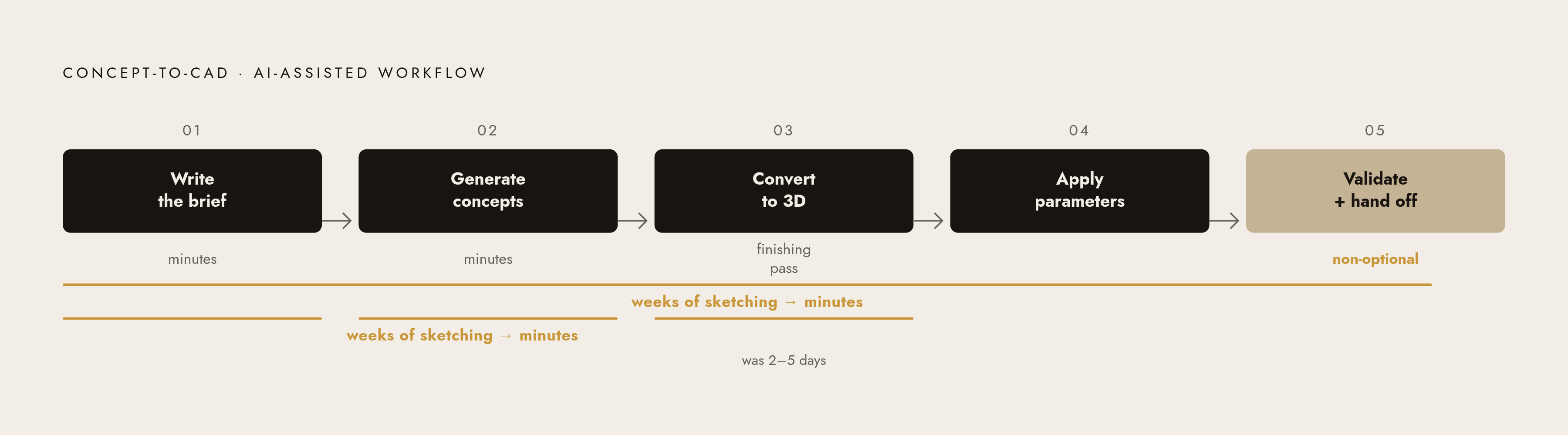
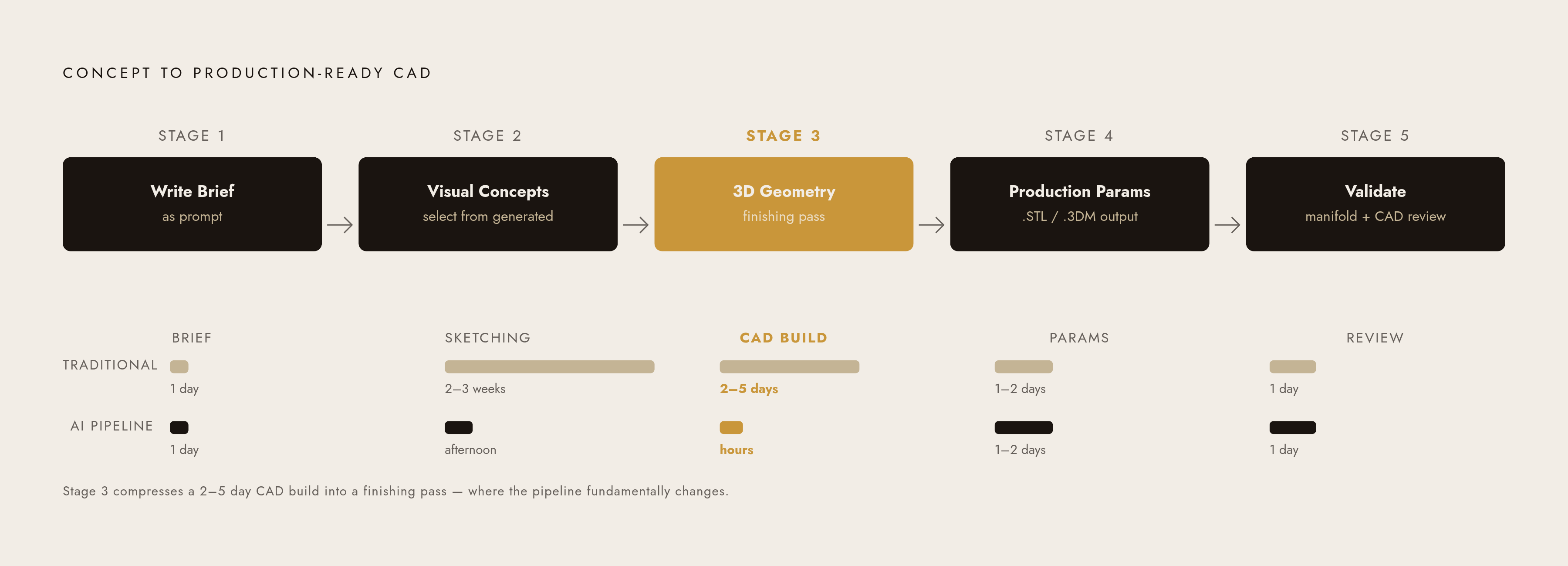
Here's how the concept-to-first-CAD workflow actually operates, stage by stage.
Stage 1. Write the brief as a prompt
Vague prompts produce vague outputs. Specificity is the single fastest thing you can do to improve output quality at this stage.
A useful prompt: "a delicate bridal band with a pavé diamond center channel, twisted shank, rose gold, approximately 2mm wide."
Include:
- Metal type
- Gemstone (type, cut, approximate size if known)
- Style reference or period
- Distinctive structural features
- Any dimension constraints you already know
This gives the AI something to work with rather than something to guess at.
Stage 2. Generate and select visual concepts
Run the prompt. An AI-native tool produces photorealistic variations quickly. The goal isn't to find the one perfect image. The goal is to save two or three strong candidates that give the client real options to respond to.
This stage replaces the hand-sketch phase and the early feedback loop entirely. Weeks of back-and-forth, compressed into an afternoon. It still feels a little surreal, honestly.
Stage 3. Convert the selected concept to 3D geometry
This is where tools diverge most sharply.
For simpler forms like solitaires, standard hoops, and bezel pendants, AI-generated geometry can serve as a cleanup pass rather than a full rebuild. For complex sculptural forms, AI geometry establishes topology and proportions while a CAD pass refines for manufacturing precision.
Emerging geometry engines can process image or text input and produce watertight, manifold-ready meshes. What used to be hours of manual mesh repair becomes minutes. Platforms that integrate this conversion natively, rather than requiring you to export to a separate tool and back, are where the largest time savings accumulate. Every extra export-and-reimport step is friction. Friction is death by a thousand clicks.
Stage 4. Apply production parameters
This is where the file becomes genuinely production-ready:
- Metal weight calculation
- Prong and setting geometry
- Sprue placement if applicable
- Parametric controls for stone size, band width, and metal type
Output: an.STL or.3DM file with accompanying renders for client approval.
Stage 5. Validate before handoff
Manifold check. No open meshes, no non-manifold edges. Geometry review by a CAD-qualified designer or manufacturer. This step is not optional. Treating it as optional is how expensive casting errors happen, and casting errors are the kind of thing that ends client relationships very quickly.
Once validated, the file goes directly to 3D printing, CNC, or casting. No translation. No intermediary.
Where the time savings actually come from
Stages 1 and 2 compress weeks of sketching and brief iteration into minutes. Stage 3, with AI-assisted geometry, compresses what was a two-to-five-day CAD build for standard forms into a finishing pass. The speed isn't magic. It's what happens when you stop doing the slow parts manually.
What parametric design adds once the first CAD file exists
The first production-ready CAD file is valuable. What you build on top of it is what makes that value compound.
Parametric design means the model tracks every step of its own construction dynamically. Change the band width, the stone size, or the metal type and the model updates. You don't rebuild. You adjust.
For individual designers, one validated base model becomes a template for an entire product family. Client requests for size or material changes take minutes, not hours. Alternate colorways, stone configurations, and profile variations all branch from one source file you already know is production-ready.
For brands handling custom orders, the impact is more pronounced. Historically, custom jobs meant a new CAD build every time. With parametric templates, the tenth custom order doesn't cost the same effort as the first. The operational math changes completely, and custom work that used to feel like a drain on the shop can actually become a growth category. That volume becomes sustainable without burning out the production team.
One thing to know going in: not every piece maps cleanly to parametric CAD. Sculptural, organic forms often benefit from a sculpting workflow instead. Precise geometric jewelry (bands, halos, pavé settings) is where parametric logic earns its keep, because exact measurements are already driving the design. Knowing which approach fits the piece is a workflow decision worth making intentionally, rather than something to figure out after you're halfway through a build.
How the same CAD output connects directly to a customer-facing configurator
A configurator is a digital interface where a customer adjusts the parameters of a piece. Metal type. Stone choice. Setting style. Size. Engraving. They see the result update in real time, with 3D visualization and live pricing.
Some platforms go further: a photorealistic render placed on the customer's own hand via device camera, no download required. That directly addresses the biggest friction point in online jewelry purchase. Customers can't try it on, and that uncertainty kills conversions. Seeing it on your hand, even virtually, moves the needle in a way that a static product photo simply doesn't.
Dynamic pricing responds to every variable in real time. Ring size, gemstone type, metal weight, regional factors. Customers know what they're paying before they commit. Purchase confidence is real and it moves.
Here's the critical link: when the underlying CAD is parametric and production-grade, every configuration a customer selects outputs a file that's already ready to manufacture. There's no translation step between what the customer sees and what gets made. The configuration is the production file. That's only possible if the CAD work upstream was done correctly, which is exactly why cutting corners in Stage 4 comes back to bite you.
The online jewelry market is increasingly competitive, and quality alone is no longer a differentiator. It's an expected baseline. The configurator is where an efficient design workflow stops being an internal efficiency gain and becomes a customer-facing product experience.
What the ten-minute workflow changes for independent designers, small brands, and enterprise teams differently
The same workflow does not give everyone the same advantage. It removes the specific constraint that was holding each tier back, and those constraints are genuinely different.
Independent designers
The traditional barrier for independent designers wasn't creativity. It was the CAD skill requirement. Tools like Rhino and MatrixGold are powerful. They also require serious training investment to use productively, and most independent designers couldn't justify that learning curve on top of actually running a solo business.
AI-native platforms change that equation. Production-ready output without requiring traditional CAD proficiency. A solo designer can explore product lines at a pace that was previously only possible with a dedicated support team, which is either exciting or mildly terrifying depending on how much you liked having that as your excuse.
Small brands and startups
Speed matters most when you're trying to find product-market fit. Iterating ten product concepts in an afternoon versus waiting two weeks per concept is not a marginal difference. It's a fundamentally different speed of learning. You find out faster what works and, more usefully, what doesn't work.
Custom orders at scale also become viable. Parametric templates mean the operational cost of the tenth custom job is a fraction of what it was before. That changes the business model entirely.
Enterprise merchandising teams
At enterprise scale, the bottleneck isn't design speed. It's configuration scale. How many SKUs, metals, stone options, and regional variants can be maintained across a live catalog without that catalog becoming unmanageable?
Parametric logic and API-level access allow enterprise configurators to serve thousands of product combinations from a managed set of validated base designs. AI agents embedded in storefronts can guide customers through customization and surface the right configurations. That's where the CAD workflow connects directly to sales automation, and where the ROI conversation gets much easier to have with a CFO.
Each tier gets something different from the same workflow. Faster design means something specific to each one, and for each one, it removes exactly the constraint that was actually in the way.
Evaluating AI jewelry design tools against the production-ready standard
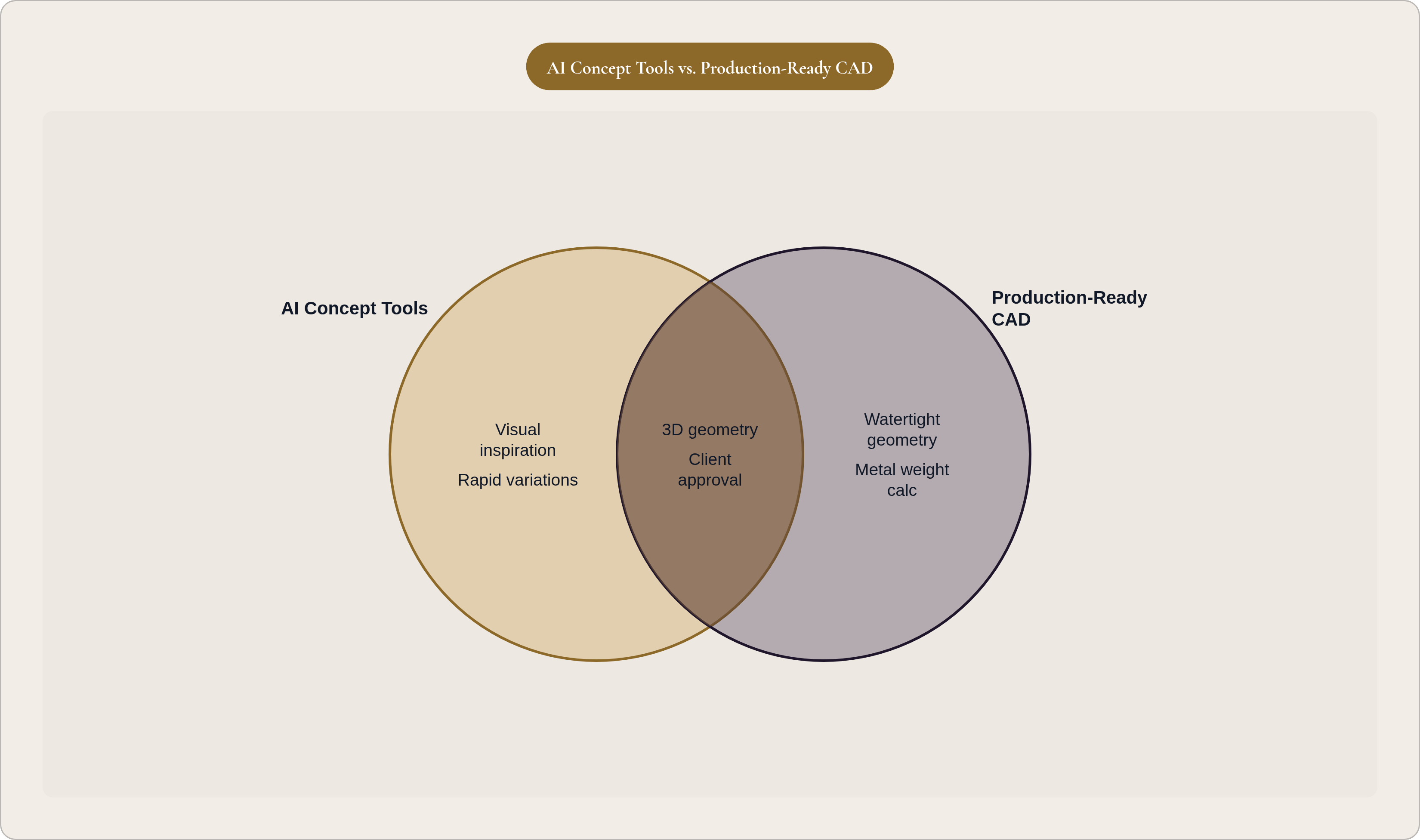
The market for AI jewelry design tools is growing fast, and the marketing language is running well ahead of actual capability. Two questions cut through most of it.
First: does the output continue into a 3D workflow, or does it stop at an image? A qualified CAD designer or manufacturer must validate final geometry before production in every case. That's a given. But there's a large difference between validating a model and rebuilding one from scratch. Tools that stop at an image require a full rebuild. Tools that output geometry that can be refined and validated are doing something meaningfully different, and that difference is measured in days of turnaround time.
Second: can it generate ten to twenty variations quickly, or does each variation require significant prompt re-engineering? For professional use, variation speed needs to be nearly effortless. If getting to the fifth concept requires the same effort as getting to the first, you haven't compressed the concept stage. You've just made it digital.
The tool landscape in brief (2026)
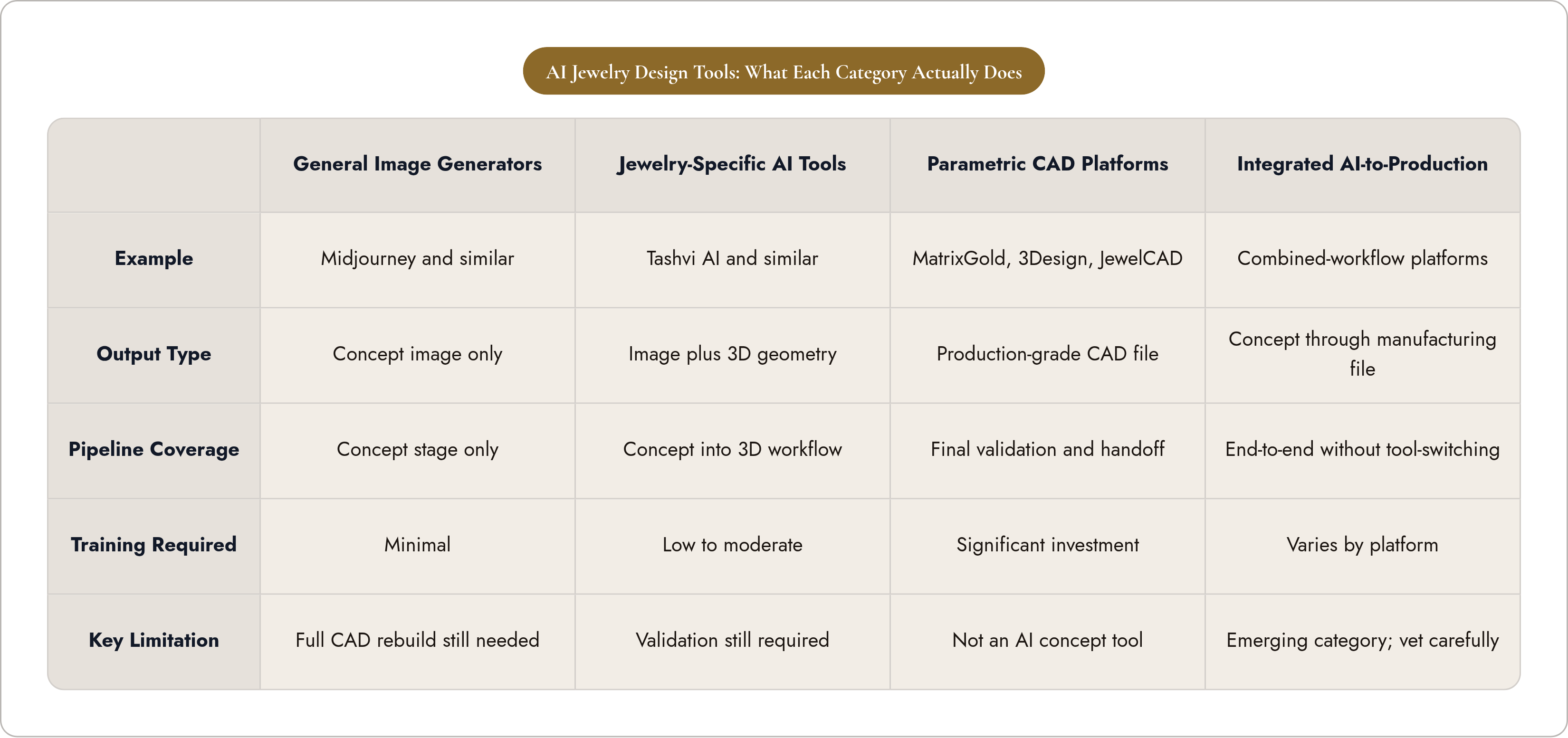
- General image generators (Midjourney and similar). Strongest for artistic inspiration and visual direction. Stop at the concept image. Require a full CAD build after selection. Valuable, but not a complete pipeline.
- Jewelry-specific AI tools (Tashvi AI, for example). Purpose-built for jewelry design. Can continue selected concepts into a 3D workflow rather than stopping at an image. Closer to a complete pipeline.
- Professional parametric CAD platforms (MatrixGold, 3Design, JewelCAD). Industry standard for production geometry. Require significant training investment. Strongest for final manufacturing validation and handoff. These are not AI-native concept tools, but they remain critical for production integrity.
- Integrated AI-to-production platforms. The category that combines concept generation, parametric CAD, and direct manufacturing output in a single workflow. This is where the speed benchmark becomes achievable end-to-end without stitching together multiple tools and losing time at every seam.
The tools to execute a compressed design workflow exist today. The remaining constraint isn't technology. It's knowing which part of the pipeline each tool actually covers, and being honest with yourself about where your current stack has gaps.