Real-Time 3D Visualization in Jewelry Configurators
Live 3D rendering turns jewelry browsing from a leap of faith into hands-on customization.

Online jewelry buying isn't a niche anymore. It's a huge chunk of total jewelry sales now, and custom work is the fastest-growing slice: people building a ring or pendant that's theirs and nobody else's.
That growth runs straight into a problem jewelry has always had. Screens don't offer touch. Rings and necklaces are tactile, personal, expensive things, and buying one off a photo has always taken a leap of faith. The buyers driving this shift, mostly millennials and Gen Z, don't have patience for leaps of faith. They grew up tapping and swiping and expecting things to respond, and more of them are buying fine jewelry for themselves instead of waiting for someone to gift it. Spending your own money on a decision sharpens your standards, and a flat product photo just doesn't clear that bar anymore.
Real-time 3D visualization is the tech built to close that gap. "3D" gets thrown around loosely in retail tech, though, and most of what carries that label isn't actually this.
What real-time 3D visualization actually does inside a configurator
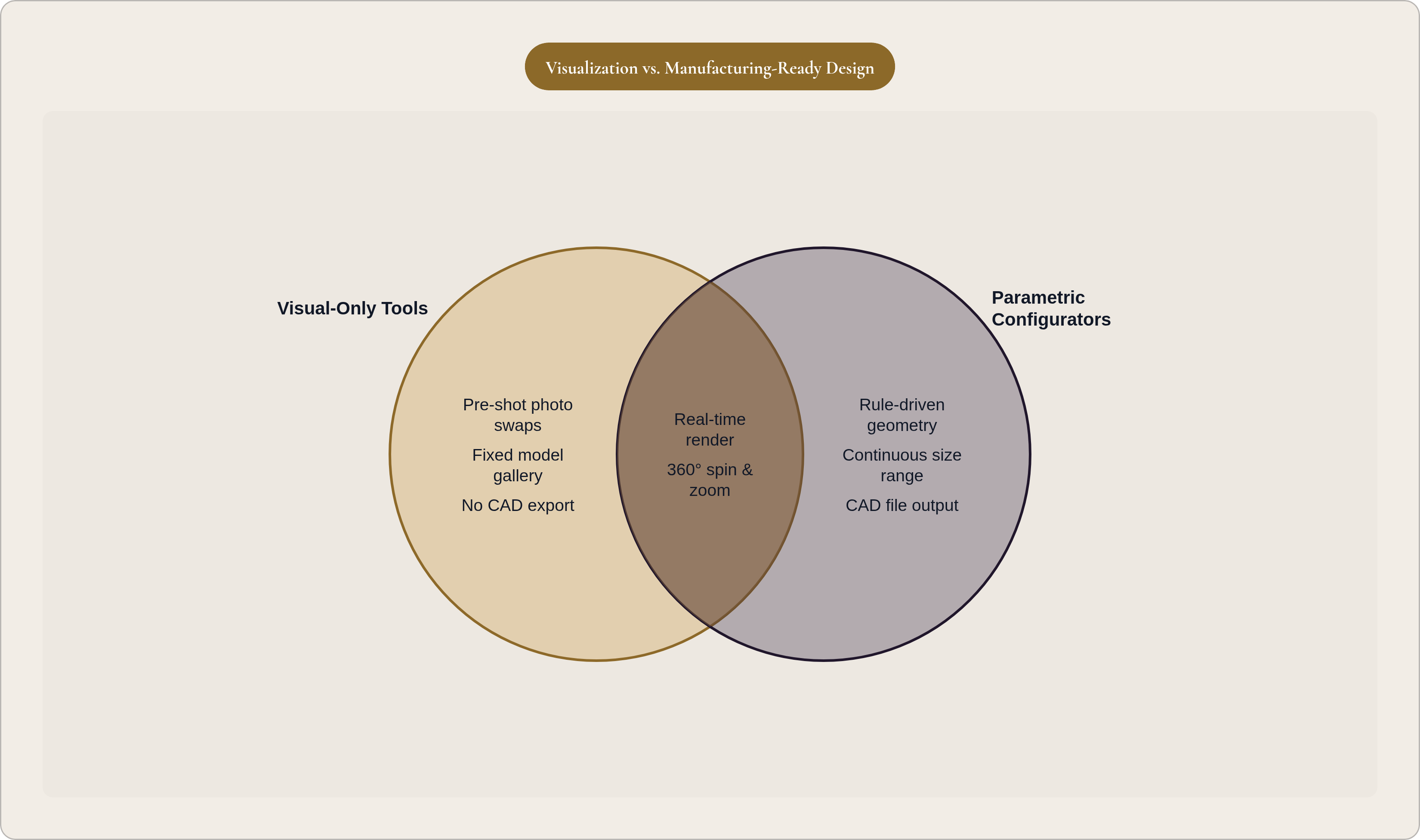
It's a rendering engine that updates a photorealistic 3D model the instant someone changes something. Swap the metal, resize the band, add a stone, and the model updates live, on screen, with no reload and no spinner. Nobody's swapping in a different pre-shot photo some photographer took last Tuesday.
Sounds simple until you think about what jewelry actually demands from a renderer. Metal isn't one material. White gold, yellow gold, rose gold, and platinum each bounce light differently and carry different color casts, and a renderer that gets this wrong ends up looking like a cutscene from a budget video game. Stones complicate things further, since a diamond bends light differently than an emerald, which bends it differently than a sapphire, and the cut changes that behavior all over again. Throw in setting geometry (prong placement, bezel edges, pavé texture, the inner walls of a channel setting) plus proportion questions, like how a wider band reads next to a given stone size, and jewelry asks more of a renderer than almost any other product category.
Most of this runs on WebGL, right in the browser. No plugin, no download, no "launch our 3D viewer in a separate window that may or may not load." It sits inside the product page. The 360-degree spin, the zoom, the AR overlay that puts a ring on your actual hand through your phone camera: none of these are bolted-on extras. They're the same engine pointed at different outputs.
The real tell is who's driving. A video loop or a gallery of pre-shot photos is something you watch. A real-time configurator is something you drive.
How parametric models make instant rendering possible
None of that rendering works without something underneath that can actually change shape on command. That something is a parametric model: a 3D model built from adjustable inputs (band width, finger size, stone dimensions, metal type, engraving text) instead of one fixed shape sitting in a file.
Change a parameter, and the whole model recalculates. Proportions hold. The render reflects the new state right away. That's the entire difference between a real configurator and a glorified gallery of pre-made options dressed up to look interactive: one has a model that can genuinely change, the other has a shelf of finished products.
A parametric system encodes rules a catalog of finished designs never could. Sizing stays proportionally correct across a continuous range, not just the standard whole and half sizes on a size chart. Prong spacing adjusts on its own when someone bumps the stone size up or down. Material swaps keep the geometry identical while changing surface properties for the new metal. Engraving text bends to follow the inner curve of a band and renders live, in the chosen font, on the actual curved surface, which is how Thinkspace's runtime engraving feature handles it.
That engraving detail matters more than it sounds like it should, because the same parametric foundation that makes it possible is what lets the model become a manufacturing file later. The geometry follows rules instead of being hand-sculpted pixels, so it exports as something a machine can build. Skip that foundation, and a configurator shows a hundred pretty options with no idea whether any of them would survive a casting machine.
The configurator platforms serving the jewelry market today
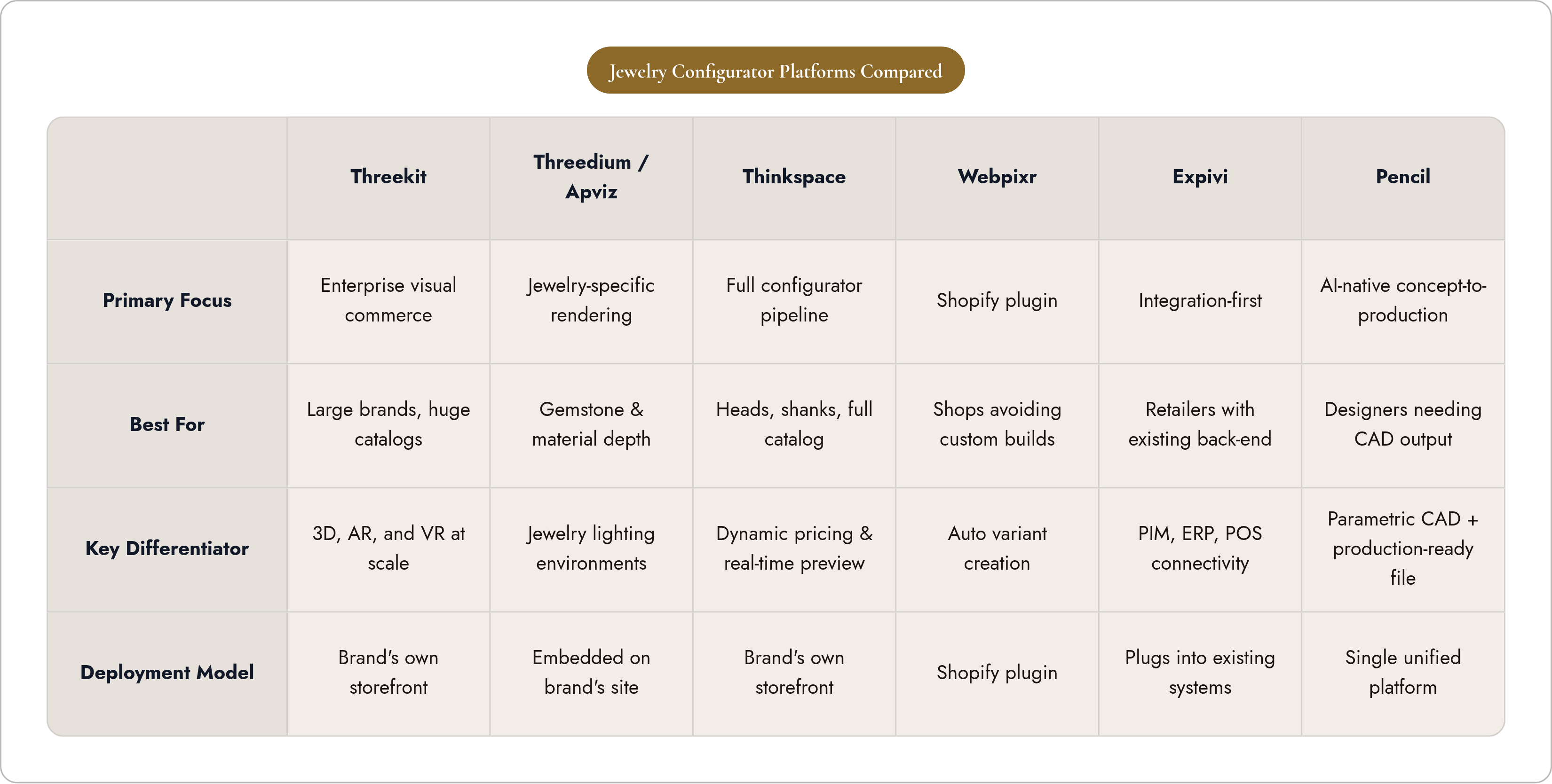
The market's got a handful of distinct approaches, solving different problems rather than competing for the same customer.
Threekit sits on the enterprise end: catalog-scale visual commerce across 3D, AR, and VR, built for brands running huge product lines. Threedium and Apviz go narrower and deeper into jewelry specifically, tuned for gemstone rendering and jewelry materials. Apviz in particular offers real-time engraving and lighting environments built for jewelry, embedded directly on a brand's own site rather than routing shoppers somewhere else to finish the job.
Thinkspace runs a fuller configurator and rendering pipeline, covering heads, shanks, metals, and stones with real-time preview and dynamic pricing across a whole catalog. Webpixr takes the plugin route for Shopify merchants, a real-time material configurator for metals and stones with automatic variant creation, aimed at shops that want configurator capability without commissioning a custom build. Expivi leans integration-first, built to plug into existing PIM, ERP, and POS systems, a fit for retailers who already have back-end infrastructure they're not eager to rip out.
Pencil takes a different angle: an AI-native platform combining parametric CAD generation, real-time configuration, and production-ready output in one place, so a designer or brand goes from concept to a configurable, manufacturable product without stitching together separate CAD software and a separate visualization tool.
Three questions actually separate these platforms once you sit down to evaluate them. Does the configurator stop at a pretty render, or carry through to something a factory can use? Does it live inside the brand's own storefront, or send the shopper somewhere else to finish? And is it catalog-driven, built on a fixed library of pre-made models, or truly parametric, built on rules that handle continuous, one-off customization?
What shoppers actually do differently when a configurator is real-time
The behavior shift isn't subtle. Shoppers who get to interact with a 3D model explore more combinations, linger longer, and convert at meaningfully higher rates than shoppers stuck looking at static photos. That's not a marginal bump. It's a different kind of shopping trip.
The mechanism is uncertainty reduction. When you can see how rose gold sits against a particular stone, or how adding a halo changes a ring's silhouette, the decision gets easier because you're not guessing. Once that uncertainty drops, people get bolder; given a real-time preview, buyers move away from the safe default option and start building something specific to them.
That boldness pays off downstream too. Return rates on custom jewelry run structurally lower than off-the-shelf pieces, for a pretty obvious reason: the buyer built the thing. They knew exactly what they were getting because they watched it take shape in front of them. Pair that with the self-purchase trend and you get a shopper extra motivated to see the exact object before hitting buy.
For pricier pieces especially, rotating, zooming, and viewing a ring under simulated lighting stands in for the in-store experience of handling something. AR pushes that further, letting someone hold a ring up to their own hand or a necklace against their own collarbone without walking into a store.
Why visualization that stops at the screen creates a manufacturing problem
Here's where things get less glamorous. Plenty of visualization tools produce gorgeous, photorealistic renders with no real connection to a shape anyone could actually cast in metal.
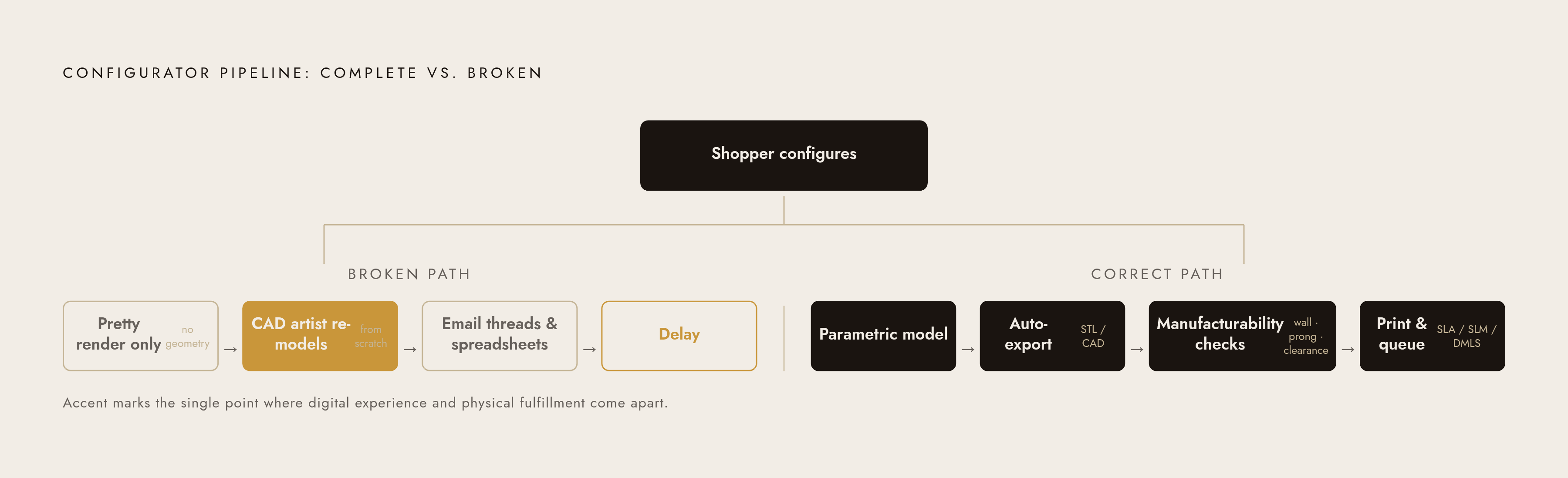
That's the gap. A render can show a stone floating in a setting with wall thicknesses no caster could pour, prongs placed somewhere that couldn't hold a stone, or proportions that would fail a basic manufacturing check on sight. It looks perfect on a monitor and falls apart the second someone tries to build it.
So what happens next? Someone downstream, usually a CAD artist, has to re-model the piece from scratch based on the approved render, guessing at details the render never specified. That reintroduces the exact delay the configurator was supposed to kill. Without a real digital thread running from configuration to production file, orders flow out of a slick front-end tool and into email threads, spreadsheets, and manual CAD requests, the same disconnected mess modern design tools exist to get rid of.
Automated manufacturability checks (wall thickness, prong strength, stone clearance, castability) can only run against a real geometric model. Nobody runs a structural check on a JPEG. A design that can't go straight into production isn't production-ready, no matter how good it looks on a screen. For made-to-order jewelry businesses, this exact gap is usually where the slick digital experience and the physical fulfillment process come apart at the seams.
How the configurator-to-CAD pipeline works when it's built correctly
Get the foundation right, and this stops being a problem. Since a parametric model is rule-driven geometry, every valid configuration a shopper produces on screen is also, automatically, a valid 3D model. That's not a bonus feature. It's the entire point of building it parametrically in the first place.
From there, the configuration exports as a CAD file (usually an STL or something equivalent) already checked against manufacturing constraints before it leaves the system. On the production side, that file gets verified for open surfaces, overlapping geometry, and minimum wall thickness, then goes to physical production: SLA or DLP printing for resin patterns headed to investment casting, or SLM and DMLS for direct metal printing when the geometry (filigree, micro-pavé, that kind of fine detail) is too complex for casting to pull off cleanly.
Where ERP and MES systems connect on the back end, the configuration itself can trigger job scheduling, reserve materials, and generate a work order automatically. Nobody's retyping anything twice. And because rapid prototyping sits inside this loop, a printed resin sample lets a customer or designer check proportions and setting details before a single ounce of metal gets cast, so the iteration happens in a CAD file rather than in a pile of ruined wax models.
The practical result, in a shop built to do this properly, is that a customer configuring a ring on a website at lunchtime can have a real production file sitting in the shop's queue by early afternoon, with no CAD artist translating a picture into a shape somewhere in the middle. Pencil builds around exactly this: every configuration a customer produces outputs a production-grade CAD file ready for casting, so what showed up on screen is, quite literally, what gets made.
What AI adds to a configurator that parametric design alone doesn't provide
Parametric models get you instant rendering and geometry you can trust. AI stretches that in a few directions the rules alone can't reach.
Natural language input lets a shopper, or a designer, describe a piece in plain words and get a starting point generated for them, skipping the menu-diving it normally takes to land on the right combination. Generative tools produce genuinely new geometry from a prompt instead of pulling from a fixed shelf of pre-built modules, which widens what a configurator can offer without someone hand-modeling every new option. Image-to-CAD tools let a customer upload a reference photo and get back a configurable model that approximates it. Automated pricing intelligence handles stone counts, size conversions, and cost calculation without a human typing numbers into a spreadsheet, the way the Star Gems platform, launched in 2025, does.
The speed difference is the part worth sitting with. Traditional CAD turnaround from a hand sketch used to take several days and required someone with specialist training. AI-assisted generation compresses that to minutes, and in customer-facing tools, down to the length of a single configuration session. RhinoArtisan's Ettore shows what that looks like in a physical store: a jeweler designs with the client sitting right there, adjusts the piece on request, prices it instantly, and sends it to production, so the configuration session basically is the sales conversation. For independent designers and smaller boutique brands, this is what makes a genuinely sharp configurator possible without a full design team on staff.
Fully automated concept-to-production CAD, with zero human checking anywhere in the loop, isn't here yet, even as accuracy keeps climbing. The workflows that hold up right now use AI to speed things along and lean on the parametric layer underneath to guarantee the output can actually get built.
What a well-built jewelry configurator looks like end to end
A configurator that actually works has to satisfy four layers at once, and most on the market only nail two or three.
The customer sees a real-time render updating instantly on every choice (metal, stone, setting, band width, engraving) with accurate polish and reflectivity per metal and correct optical behavior per gemstone. Spin and zoom come standard, AR placement layers on top, pricing updates live alongside the configuration instead of hiding behind a "request a quote" form, and engraving previews live, in the actual font, bent correctly around the curve of the piece.
Underneath, every valid configuration outputs a production-ready CAD file automatically, with manufacturability rules baked into the parametric model itself so a shopper physically cannot configure something that couldn't be built. The order then flows straight into production scheduling without a human retyping any of it.
On the design side, the parametric foundation needs to handle continuous inputs, not a locked menu of pre-built choices, with AI layered on for natural language design, novel geometry generation, and automated material intelligence, scaling from a single SKU up to a full catalog. And the whole thing needs to actually plug in: living inside the brand's own storefront rather than shipping the shopper off to a third-party tool, connecting to PIM, ERP, or POS where those systems already exist, and working the same whether it's on a website, an in-store tablet, or a one-on-one sales conversation.
Pencil is built to hit all four layers in a single platform, offering over five million customization options across parametric and AI-driven generation, with every configuration producing a manufacturing-ready output, usable by an independent designer working solo and an enterprise brand running a full catalog, on the same underlying infrastructure.