Building a Jewelry Product Configurator on a Shopify Storefront
Parametric design rules close the gap between customer concept and castable geometry.

A configurator is a live design engine that has to enforce valid combinations, show the customer what they are actually building, and spit out a file a casting house can run with. All at the same time.
Here is where most builds quietly fall apart. Visualization tools generate beautiful renders but produce no usable geometry. Shopify's native variant system was built for fixed SKUs and hits a wall the moment you introduce continuous inputs like ring size or stone diameter. And the manual translation step, where a human designer rebuilds each customer order as a production file, is fine at ten orders a month and a disaster at a hundred.
The failure mode is always the same. A weak parametric layer feeds bad data to the visual layer. The customer sees something that does not match what gets made. The production file is off. The casting house calls with questions. Margin disappears into rework.
GIA has noted directly that tools like Midjourney have no understanding of how jewelry is actually constructed. They stop at a concept image. That gap between concept and castable geometry is exactly what a real configurator has to close, and most implementations never close it because they treat visualization, logic, and production output as three separate problems to solve in isolation.
That is how you end up with a very expensive demo.
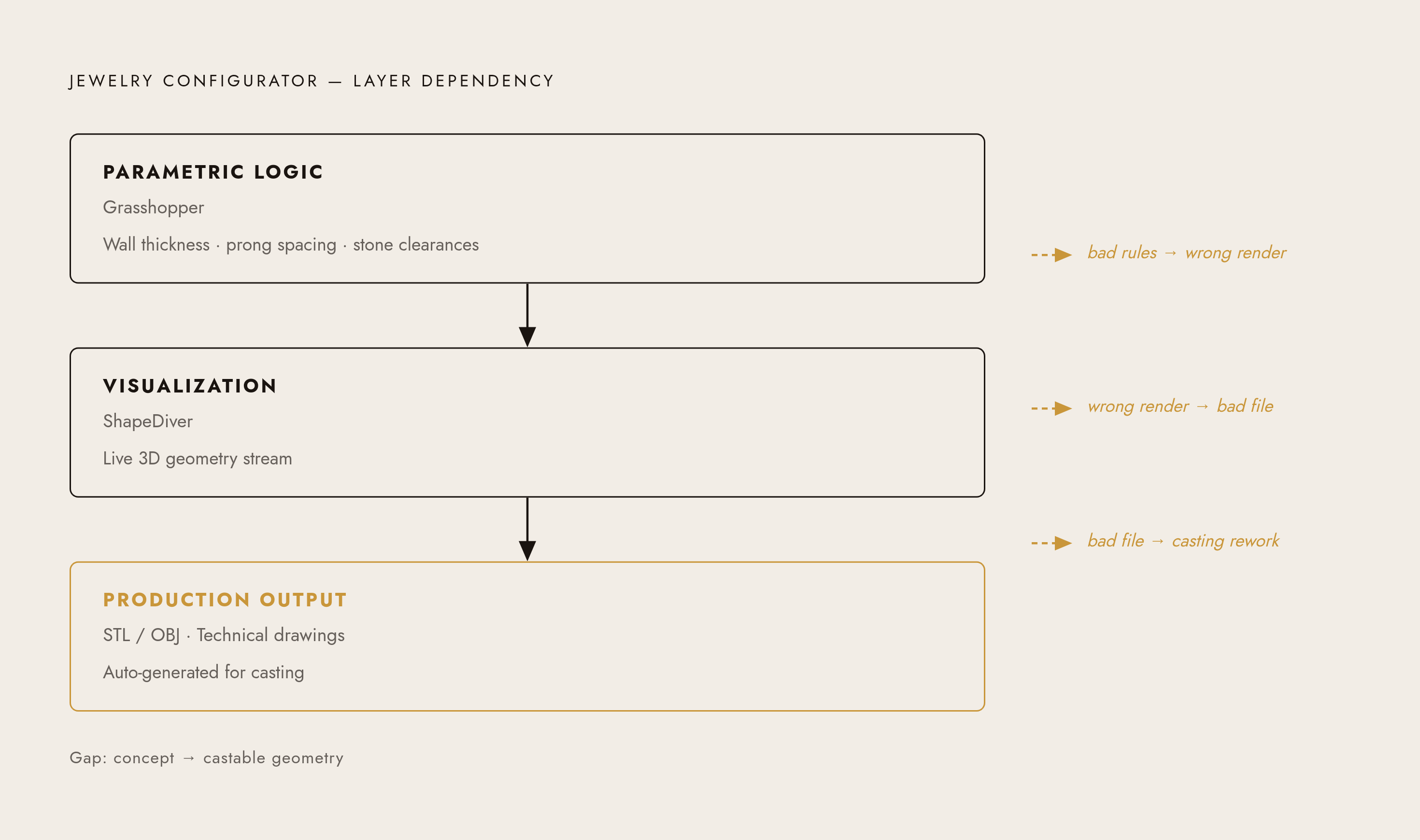
How parametric design logic works and why it is the foundation everything else sits on
Parametric design means the geometry is defined by rules, not fixed shapes. Change one input and the whole model updates to stay structurally valid.
In jewelry, this plays out in concrete ways. Ring size goes up: shank diameter, finger clearance, and metal weight all adjust. Stone size increases: prong spacing, bezel wall thickness, and setting height update to keep the setting sound. Metal type changes: pricing recalculates without a separate lookup table. None of that requires a designer to manually redraw anything. The rules do it.
The tool most jewelry designers use to build this logic is Grasshopper, a visual programming environment that runs inside Rhino. You define relationships between inputs as a node graph. One Grasshopper file can generate thousands of valid configurations. It is a set of rules that draws the model for you every time a customer touches a slider.
Manufacturability constraints go in at this stage: minimum wall thickness for the metal alloy you are casting, prong strength limits for a given stone weight, clearances so stones do not crowd each other. When those rules live inside the Grasshopper file, invalid combinations never reach the customer. The configurator simply does not offer them.
This is where the real leverage is. You build the rules once. Every configuration request after that costs almost nothing to fulfill. The geometry is the variable, not a library of pre-rendered image assets.
Most people underestimate how long it takes to get these rules right. Getting a model to generate valid geometry is step one. Getting it to generate valid geometry across every combination a customer might reasonably try, including the weird edge cases, is the actual job. That part takes time and it is worth taking seriously.
Bringing the parametric model into Shopify using ShapeDiver
ShapeDiver is the platform that connects Grasshopper files to web-based configurators, including Shopify storefronts. The integration is more straightforward than it sounds.
You build and validate your parametric model in Grasshopper, upload it to ShapeDiver, and ShapeDiver hosts it and exposes your parameters as a web app. ShapeDiver's Shopify app adds a "Customize" button to your product pages. The customer clicks it, a 3D configurator opens in a modal overlay, they build their piece, and they add it to the cart without leaving the page. ShapeDiver launched its Shopify app in January 2025 and it runs at $199 per month.
What ShapeDiver handles so you do not have to:
- 3D rendering and browser streaming, no WebGL developer needed
- Hosting and security infrastructure
- Dynamic pricing tied directly to parametric inputs, so price updates as size, volume, and material change
- Auto-generation of technical drawings or production files per order
The staffing math here is worth spelling out. Hand-coding an equivalent WebGL configurator from scratch typically requires a WebGL developer, a frontend engineer, and someone handling infrastructure and security. ShapeDiver's App Builder collapses that to one computational designer who owns the Grasshopper model, the UI, and deployment without writing custom code.
Gemme Jewelry, a German high-end jewelry brand, runs its entire 3D-printed jewelry configurator on Grasshopper plus ShapeDiver plus Shopify. A few sliders open up a near-unlimited design space, and the team can swap models and update configuration options without touching the web development side.
What the customer actually experiences inside a well-built jewelry configurator
The configurator opens as an overlay on the product page. No new tab, no lost context, no starting over.
As the customer moves inputs, the 3D model updates live. They are watching actual geometry change, not a swap between pre-rendered images. Sliders work well for continuous variables like ring size, stone diameter, and band width. Dropdowns or swatches work for discrete choices like metal type, finish, and stone type. Text fields handle engraving. Pricing updates as parameters change, so the customer sees what each choice costs without submitting a quote request or waiting for a callback.
A few things make or break the experience at this layer.
Render fidelity matters more than people expect. If the ring on screen looks noticeably different from the piece that arrives, trust breaks at the worst possible moment: unboxing. That is a bad place to lose a customer you already converted.
Constraint feedback is the one people most often underestimate. When a combination is not valid (say a stone that is too large for the selected band width), the configurator should block that selection and tell the customer why. Silently accepting an unmakeable order is both a conversion killer and an operational disaster. The customer thinks they bought something. Your production team knows they did not. Someone has to make an awkward phone call.
Mobile responsiveness is non-negotiable. Jewelry impulse purchases and gift purchases skew heavily mobile. The overlay has to actually work on a phone screen.
Every one of these UX details is downstream of the parametric model. A well-structured Grasshopper file makes constraints automatic. A poorly structured one means patching those constraints at the UI layer, where they create friction instead of clarity. You cannot design your way out of a broken parametric foundation.
Closing the loop from customer configuration to production-ready manufacturing file
"Production-ready" has a specific meaning and it is worth being precise about. It is a CAD file, typically STL or OBJ, with correct wall thickness, correct prong clearances, and correctly cut stone seats. It comes with technical drawings the casting team can use. And it gets generated automatically per order, without a designer stepping in after the sale.
ShapeDiver can export manufacture-ready files per order automatically. The production data flows out of the configurator without manual work. The standard path downstream from there: STL export, resin or wax prototype, lost-wax casting, stone setting and finishing.
Pencil Design fits into this stage as well. It generates production-ready CAD directly from parametric configurations, so every option a customer can select on the storefront maps to a castable output. It closes the gap between what the customer approves on screen and what actually gets made.
Here is the practical business case. A mistake at the digital stage costs nothing. A mistake after casting means losing metal, labor time, and margin. The parametric constraints you get right in Grasshopper are the constraints that do not become casting errors six days later.
The target state, operationally: a customer configures a ring Wednesday night. The order arrives in the production queue Thursday morning with a validated CAD file attached. No human design step in between. When you get there, you have something that actually scales.
How to scope the build (what to tackle first, what to defer, and where complexity compounds)
Start with one product category and one clean set of parameters. A solitaire ring with metal type, stone size, and band width is a well-contained first build. It exercises all three layers without overwhelming the parametric model or the team building it.
Complexity compounds fast in jewelry, and it catches people off guard. Every new stone shape needs its own seat geometry in the Grasshopper file. Every new metal alloy will need adjusted minimum wall thickness. Multi-stone designs like pavé or halo multiply the constraint relationships quickly and in ways that are hard to predict until you are inside them.
What to defer until your first configurator is live and converting:
- Engraving previews with real font rendering
- A full material library with accurate reflectance maps
- Multi-piece matched sets that require linked parametric models
On staffing: Grasshopper and Rhino computational design is the core skill and it is not the traditional jewelry CAD path. Plan to either hire a specialist or commit real learning time. ShapeDiver's App Builder is no-code and manageable by the designer once the model is built. Shopify theme work is minimal if you use ShapeDiver's modal overlay out of the box.
A functional first configurator for one product with three to five parameters is achievable in weeks. What actually takes time is getting the parametric constraints tight enough that the production file is trustworthy every time. Pencil Design's parametric design system gives designers a starting point rather than a blank file. With over 100,000 designers on the platform and more than 5 million customization options already built through it, there is a meaningful head start available versus building every constraint from scratch.
What makes a jewelry configurator convert (and what causes shoppers to abandon it)
The configurator is a sales interaction. How it is designed determines whether people complete it or leave.
Visible price at every step is probably the single most important thing. Uncertainty about cost is the most common reason shoppers abandon custom jewelry flows. Show the number. Update it as they make choices.
Limited, purposeful choices matter almost as much. Too many parameters at once creates decision paralysis. The best configurators walk the customer through choices in a logical sequence, one at a time, rather than presenting a wall of options and wishing them luck. Trust signals belong inside the overlay too: production timeline, materials details, return policy. The customer should have everything they need right there in the configurator.
On the abandonment side, a few things come up again and again. Render quality that looks obviously "digital" next to polished product photography makes customers discount what they see. Configurations that silently break lead customers to blame themselves or the site. Either way they leave. And a standard cart confirmation built for fixed SKUs does not work for a custom order. The customer needs to know their specific configuration was actually captured, not just that something was added to a cart.
This purchase is emotional and considered. Someone is buying a ring, probably for a person they love, and they are spending real money on it. The configurator has to feel like a guided conversation, not a technical form they are filling out.
Every conversion failure traces back to how the parametric model or the integration was built. The render looks wrong because the geometry is wrong. The constraint breaks silently because it was never encoded in the model. The order confirmation is vague because the configuration data was not structured to pass cleanly into the cart. These are engineering problems showing up at the worst possible moment.