How Jewelry Designers Without CAD Training Are Making Production Files With AI
AI tools that output actual 3D files eliminate the costly CAD conversion step.

Let's get precise here, because "production-ready" is one of those terms that gets stretched until it means almost nothing. And the gap between what it actually means and what some tools deliver is exactly where designers lose money.
A production-ready file is not a pretty image. Not a render. Not a still from a configurator that photographs well. It is a 3D mesh with real geometry. Specifically:
- An STL, GLB, or GLTF file
- Accurate tolerances (how tight is tight enough for this joint to hold)
- Correct stone seat geometry (so the stone sits flush and secure, not just convincingly placed in a picture)
- Structurally sound metal mass (thin enough to not be expensive to cast, thick enough to not crack under normal wear)
That file goes directly to a 3D printer, a casting house, or a CNC machine. Nobody rebuilds it. It just runs.
Here's the part that keeps tripping people up. A render that looks right is not the same as a model that machines right. Prong geometry, wall thickness, undercut clearances. These are details that only matter at the manufacturing stage, and a general AI that doesn't understand the difference between a bezel setting and a prong setting will produce something that looks plausible in a browser and fails the moment you try to cast it. You won't find out until you've already paid for the attempt.
There's a secondary issue in custom work specifically. Whatever a customer approves in a rendered image must match what comes out of the cast. Any deviation breaks the custom design promise. Not as a minor quality complaint — as a business problem that lands in your inbox at the worst possible time.
The distinction to hold onto through everything that follows: visualization versus production file. Tools that stop at visualization give you a better presentation. Tools that produce manufacturable geometry give you a production business. Those are not the same product, and they are not priced or evaluated the same way.
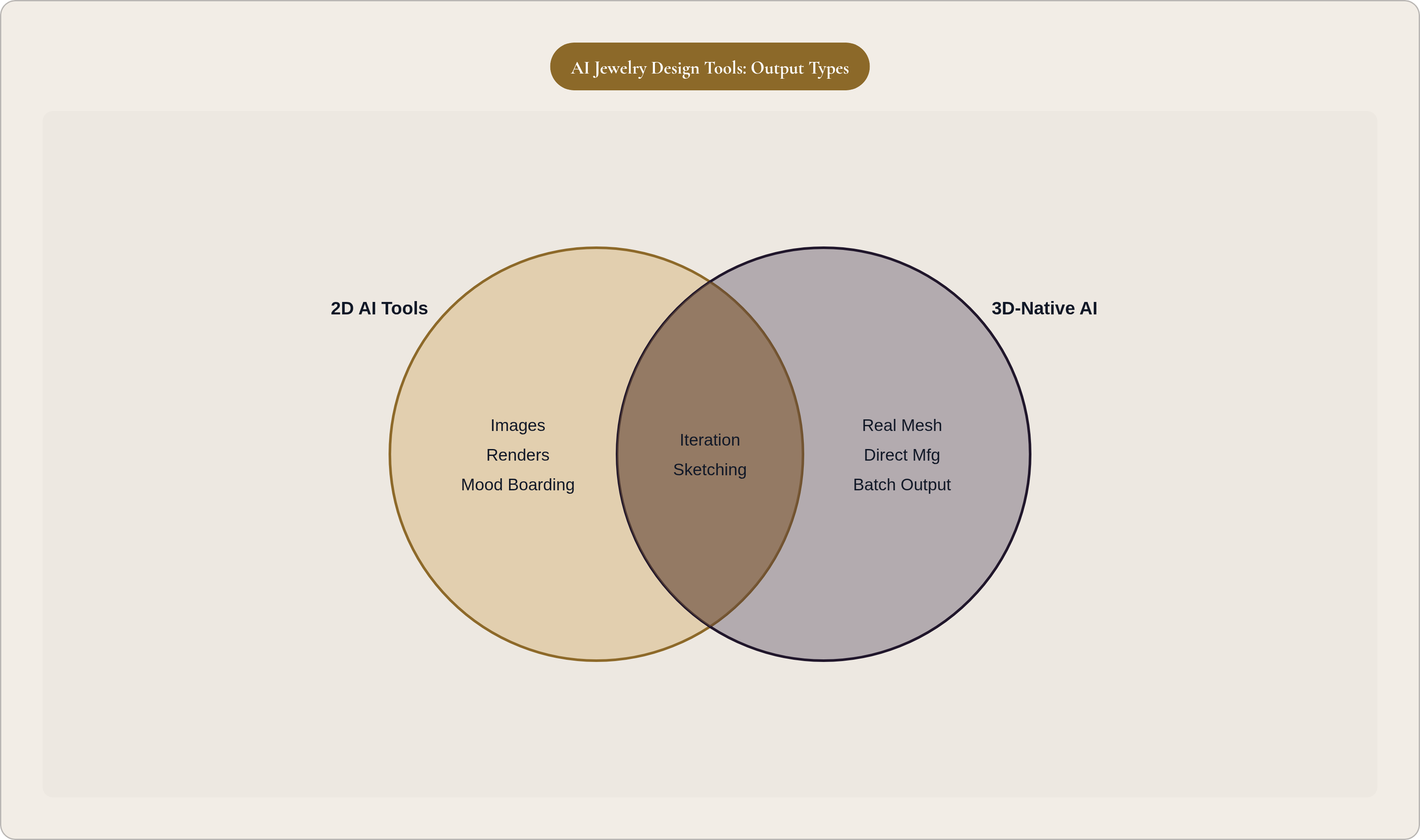
How the AI jewelry design landscape actually breaks down in 2025
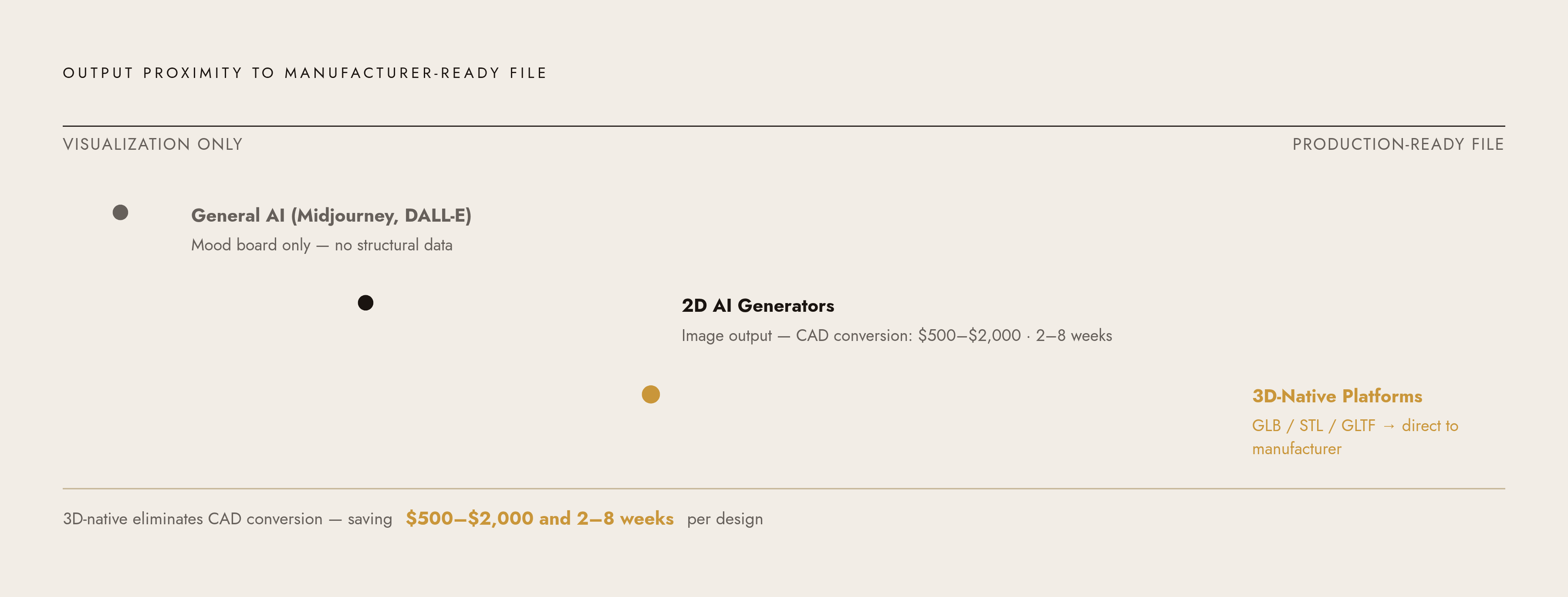
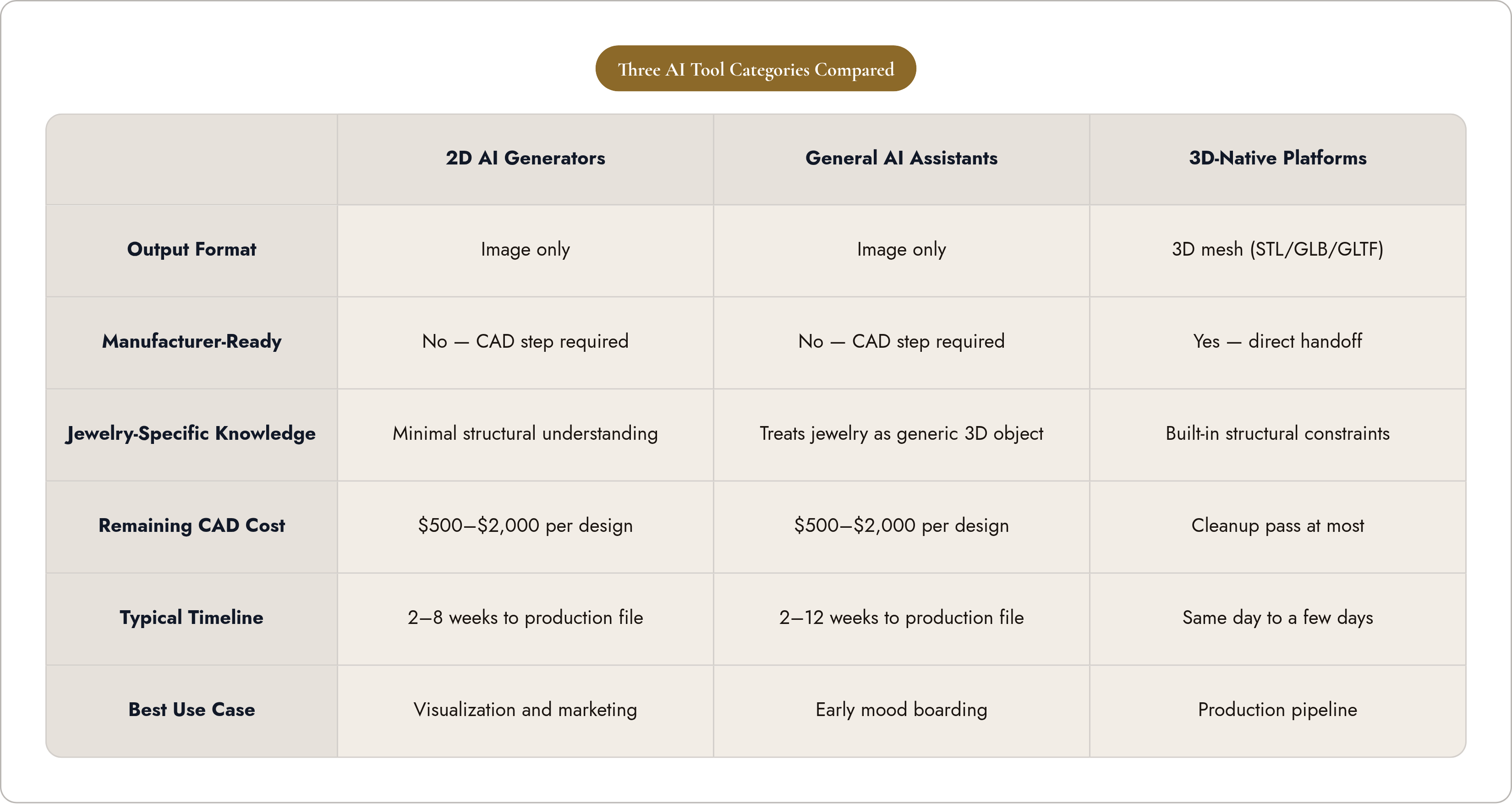
The market is not one thing. There are three distinct categories of AI tool, and treating them as interchangeable is how designers end up with a workflow that costs more than the one they started with.
2D AI generators
These produce photorealistic images from text prompts or sketches. Fast, impressive, genuinely useful for certain stages of the process. But the output is an image. Not a file a manufacturer can touch.
To get from a 2D AI image to a production file, you still need a CAD conversion step. That process costs roughly $500 to $2,000 per design, depending on complexity, and can add two to eight weeks including revisions. The AI didn't eliminate the CAD dependency. It just moved it one step downstream.
Some tools in this category have attracted significant venture investment and are useful for visualization and marketing content, but are not built for direct-to-manufacturing output.
General AI assistants
Midjourney, DALL-E, and similar tools can produce jewelry-adjacent images, but they don't reliably understand what "pavé setting" or "cathedral shank" means in structural terms. They treat jewelry like any other 3D object. That's fine for early-stage mood boarding. It's not useful once you need the piece to actually exist.
Autodesk announced Project Bernini in May 2024, which pushes toward more geometry-aware generation, but jewelry-specific structural constraints are a genuinely different problem than general 3D generation. The gap is real.
3D-native platforms
This is the category that actually changes the pipeline. These tools generate files with real geometry — meshes you can rotate, inspect, download, and send directly to a manufacturer. The CAD conversion step disappears.
Timeline difference: same day to a few days for moderately complex pieces, versus two to twelve weeks through traditional CAD workflows.
The category distinction is the most important thing to understand before evaluating any specific tool. The question isn't "does this tool use AI?" The right question is: where does the output land on the path to manufacturing?
From prompt or sketch to first design: what the actual workflow looks like
For designers without CAD training, entry into the process happens one of two ways.
Prompt entry
You describe what you want in plain language. "Delicate bridal band, pavé diamond center channel, twisted shank, rose gold, approximately 2mm wide." The AI returns a photorealistic rendering in under a minute. No intermediate sketch required. The brief is the starting point.
Sketch-to-render entry
You draw by hand. Paper, tablet, phone. You photograph or scan it, upload it, and the AI processes that sketch into a rendered image comparable to a CAD rendering.
This approach has an underappreciated practical advantage. Starting from a human-made drawing helps establish the "human authorship" requirement that copyright law currently looks for in AI-assisted work. A hand-drawn sketch creates a defensible foundation before AI touches anything. It's not a legal guarantee — copyright and AI is still very much unsettled territory — but it's a meaningful head start, and it puts the creative origin point in your hands rather than the algorithm's. Per GIA's Gems & Gemology from Fall 2024, sketch-first workflows also return a different quality of creative control to the designer, one that prompt-only generation tends to flatten.
The iteration loop
The first output is a starting point, not a finished design. This is actually how the process is supposed to work.
Plain-language revisions move the design forward: "make the band thinner," "switch to white gold," "add a halo around the center stone." The AI updates the specific element without rebuilding the whole design. You can isolate a region, describe the change, and leave the rest intact.
This is how you reach something with production intent behind it. Not through one perfect prompt. Through a back-and-forth that any working designer will recognize immediately as design process, just without the CAD artist on the other end of the email.
When the 3D model gets built: how AI closes the gap to a file a manufacturer can use
In a 3D-native platform, model generation takes a flat design image and builds a real mesh. A GLB file with actual geometry. You can rotate it, inspect every angle, open it in downstream CAD tools, or send it directly to a manufacturer.
This is not a render. It is a file. The difference matters.
What happens to the CAD artist
The CAD specialist doesn't vanish from every project, and anyone who suggests otherwise is skipping a real part of the conversation.
For simpler forms — solitaires, standard hoops, bezel pendants — the generated model can be close enough that CAD work becomes a cleanup pass rather than a full build. That's a different job, and it's faster.
For complex designs — intricate pavé arrangements, asymmetric structures, anything sculptural or organic — significant CAD expertise is still required. The AI closes most of the gap, but not all of it.
What shifts is the nature of the work. Refining an existing mesh is meaningfully different from rebuilding a design from a 2D sketch reference. The specialist is still in the room; they're just doing less of the expensive, time-consuming part. That changes the economics of the relationship whether or not it eliminates it entirely.
Parametric constraints
Advanced users can push further. You can specify stone dimensions, prong configuration, and metal weight targets before generation begins, so the AI works within manufacturing constraints rather than aesthetic ones alone. Shank thickness can be parametrically linked to ring size, which keeps structural proportions consistent automatically across the size run.
For a designer without technical training: across a wide range of standard-to-moderately-complex designs, the production file is now within reach without a CAD specialist in the loop at all. That range will keep widening. Right now it's already larger than most people expect.
Scale and batch production: what this means beyond a single custom piece
Single-piece iteration is one use case. Batch generation is a different one with different implications for how studios and brands actually operate.
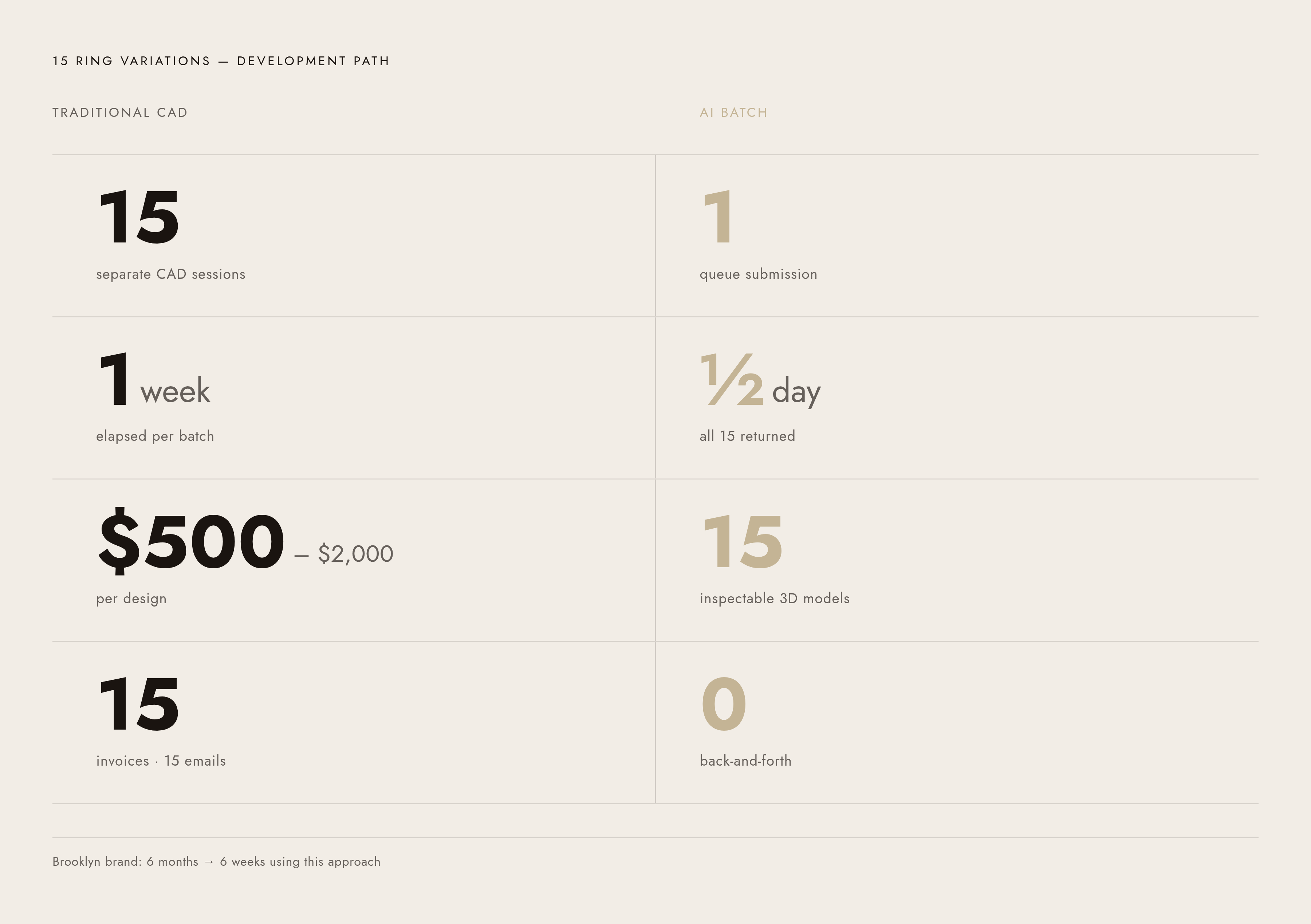
The batch workflow looks like this: select multiple design images, queue them all for 3D model generation in a single submission, let the job run while you do something else. Fifteen ring variations. All returned as inspectable 3D models. No fifteen separate CAD sessions, no fifteen separate emails to a specialist, no fifteen separate invoices.
For a design studio managing dozens of concurrent client projects, or a manufacturer processing hundreds of SKUs per season, this turns a week of CAD work into an afternoon. A Brooklyn-based brand, per a 2025 report from ifun3d.com, used 3D-printed resin prototypes from digitally generated models to test customizable stacking rings and cut development time from six months to six weeks. Not theoretical. Operational.
The layered implications:
- New collections can be prototyped and reviewed before any artisan time is committed
- Client approvals happen on rendered or interactive 3D models rather than finished pieces
- Made-to-order businesses can handle more concurrent custom orders without proportionally growing the design team
The economic logic is blunt. The $500 to $2,000 CAD conversion cost per design, across a seasonal collection with dozens of pieces, is a real budget line that shows up whether or not it's tracked carefully. Batch 3D-native generation compresses it significantly.
There's also a cost that rarely appears in any budget. Per GIA's Gems & Gemology, Fall 2024, designers routinely spend hours building out CAD models for client approval before a deposit is even collected. When a design goes through multiple revision rounds before the client commits, that unpaid CAD time compounds. Tools that shorten the iteration-before-commitment cycle have a real effect on studio economics, even if that effect never shows up on a line item.
What designers actually need to evaluate before choosing a tool
The first question is not "which tool has the best renders." The first question is "where does the output land in the production pipeline?"
The criteria that actually matter for production-bound work:
- Does the tool output a 3D mesh (STL/GLB/GLTF), or only a 2D image? This is the threshold question. Everything else is secondary to it.
- Does the AI understand jewelry-specific terminology? Not as decorative words — structurally. Does it know what a cathedral shank means for how weight distributes, or does it just return something that looks vaguely cathedral-adjacent?
- Can you iterate in plain language? Or does every refinement mean starting the prompt from scratch?
- For complex designs, what does the handoff to a CAD specialist actually look like? A mesh to refine, or a render to rebuild from? The answer changes the cost and timeline of that specialist relationship considerably.
- Does the platform support batch generation? For any studio or brand working at volume, this matters as much as single-design quality.
Learning curve is a real variable
Traditional CAD software — Rhino, MatrixGold, 3Design — takes two to five years of training before complex designs can be built independently. This wasn't a gap you could close with hustle. It was a structural dependency that shaped entire business models around who was available and what they charged.
2D AI tools have a shorter ramp, but strong prompting skills still matter, and the CAD conversion step doesn't disappear just because the starting point changed.
3D-native platforms built for non-technical users should be useful in the first session. Not the first month. Not after a training course. If a tool requires significant ramp-up time before it's productive, it hasn't actually changed the pipeline for a designer without a technical background — it's just added a different thing to learn.
Two specific notes for evaluation
For designers who sketch: prioritize platforms with a sketch-to-render pathway. It fits the creative process you already have, and it builds in the authorship foundation that matters when copyright questions come up later.
For studios and brands processing volume: batch generation and project management features deserve as much weight in your evaluation as single-design quality. A tool optimized for one-off custom pieces is a genuinely different product from one built for production at scale.
One honest thing to carry into any evaluation: for highly complex, bespoke, or structurally unusual designs, AI gets you significantly further than it did two years ago. But it doesn't yet replace a skilled CAD artist for the final production file on those pieces. Tools that tell you otherwise aren't wrong about everything — but they're not being straight with you about that part. And they're usually still billing at CAD-artist rates when the AI hands off.
What the shift means for who gets to bring a jewelry design to life
The AI in jewelry design market sits at $1.3 billion in 2025 and is projected to reach $6.8 billion by 2034, growing at an 18.7% CAGR. Infrastructure built at that scale doesn't reflect a feature update. It reflects genuine industry restructuring.
What has actually changed: design intent can now travel directly into a file format a manufacturer recognizes, without requiring the designer to speak CAD.
The old pipeline required either years of self-training or a budget for specialists — and not a small one. For a meaningful range of design complexity, AI makes both optional. That's not a marginal improvement. It's a different entry point into the industry.
Who that opens the door for:
- Independent designers who could sketch, sell, and build an audience but couldn't manufacture without outsourcing the technical step
- Boutique brands without the budget for a full design team doing custom or made-to-order work
- Designers in markets where specialist CAD artists aren't locally accessible or cost-competitive
The old pipeline created a two-class system: those who could produce, and those who had to hand off production to someone else. The cost wasn't just time or money. It was creative control at the exact moment it mattered — when a design moved from idea into object. The CAD dependency meant that the person who conceived the piece often wasn't the person who made the final technical decisions about it. That's not a small thing.
What hasn't changed: manufacturing still requires a production-ready file. The standard for what that file must contain is exactly the same as it's always been. Only the path to it has shifted.
Tools that stop at visualization give designers a better presentation. Tools that produce manufacturable geometry give them a production business. For a working independent designer who's been living on the sketch side of that line, the difference isn't incremental. It's the whole game.