Custom Gemstone Ring Configuration in Jewelry E-Commerce
Configurators let customers design high-value rings without touching them first.
A custom gemstone ring configurator exists to solve a commerce problem, not to give shoppers a toy. Jewelry, historically, could not be sold at high prices without someone touching it first, and everything a configurator does is built to answer that one fact.
Gemstone ring configurators as a commerce solution
Jewelry buying had one rule for most of its history: the bigger the price tag, the more a customer needed to hold the piece before paying for it. A configurator is the structural fix for that rule, not a nice add-on bolted onto a checkout flow that already worked fine. That distinction matters, because it changes what the tool is judged on. A feature gets judged on whether people enjoy using it. A commerce solution gets judged on whether it closes sales that would otherwise walk away. Five-figure purchases now complete on a phone, and people who used to balk at spending a few hundred dollars sight-unseen are now configuring a custom ring in the afternoon and checking out before dinner, a pattern visible in how people actually buy and evidence that this particular fix is working behaviorally rather than theoretically. The jewelry and luxury segment still converts well below the average e-commerce site, driven by high-consideration purchasing behavior, and cart abandonment rates run above four-fifths of sessions. Configurators, alongside virtual try-on, are the direct response to that specific gap. None of this is about letting a customer fiddle with settings for fun. It is about resolving one doubt standing between a browser and a buyer: does this ring, as imagined, actually exist, and can it be bought? Every section that follows is really about how a system proves the answer is yes.
What a customer does inside a ring configurator
From the customer's side, building a ring feels like a sequence of simple taps. Pick a metal. Pick a setting style. Choose the center stone, then the accent stones, then a band width, then maybe an engraving. Blue Nile's engagement ring builder takes this further, letting customers design from diamond clarity to band style. It feels casual, almost like picking toppings. The order of those choices is not random. Metal choice changes the dimensions of a stone seat. Setting style decides which stone shapes are even structurally possible. Band width limits how deep an engraving can cut. Each decision the customer makes quietly shrinks the list of valid options for the next one. A well-built platform handles this with parametric logic that reshapes the design as each choice lands, so the ring stays balanced and buildable the whole way through, and what the customer sees is one coherent ring rather than a pile of parts stacked on top of each other. Price has to move in lockstep with all of this. Every component, the band, the setting, the stones, the engraving, is modeled as a high-fidelity 3D object with real material properties, and the pricing engine runs alongside it, updating as the design updates. That pairing, seeing the ring and the price shift together in real time, is what makes this a commerce tool rather than a glorified screensaver. The obvious objection is that nobody wants this many decisions. They want a ring, not a homework assignment. Fair point, and the answer is sequencing. A good configurator stages the choices so they feel like a conversation with a jeweler who's asking the right questions in the right order. The constraint system is still running the whole time. It's hidden well enough that the customer only ever sees the next sensible question, never the engineering underneath it.
The parametric CAD layer that makes customer choices into manufacturable geometry
This is where the configurator either earns its keep or reveals itself as decoration. Parametric design is the layer standing between what the customer clicked and what a factory can actually produce, and it's the piece doing the real translation work. In practice, this means every variable the customer touches, ring size, metal, stone dimensions, setting type, lives as a parameter inside a constrained model. Changing one value makes the geometry adjust everywhere it needs to, automatically, keeping the structure sound and the proportions right, without a human opening a CAD file to fix it by hand. The part doing the heaviest lifting, and the part a customer never sees, is constraint enforcement. The system has to block combinations that simply cannot be built: a stone too big for the setting holding it, a prong arrangement that would snap under ordinary wear, a band too thin to carry the engraving someone just typed in. Some platforms now layer AI on top of this parametric core. Gemvision Matrix pairs CAD precision with AI design suggestions, so when a jeweler is building a custom engagement ring, the system proposes variations on band shape, stone cuts, and side-stone arrangement, and the client can look at all of it in 3D and iterate from there. Tripo AI works from the other direction, turning a reference photo of a ring, pendant, or bracelet into a complete 3D model with textures already applied, which matters specifically when the goal is connecting a visual idea to something buildable rather than producing a pretty picture. Across current CAD platforms generally, AI features now assist with parametric modeling, automatic stone placement, and structural analysis, but none of this replaces the CAD modeler's judgment. It speeds up the tasks that used to eat their time. What comes out of this layer is the whole point. It's a production-grade CAD file carrying every approved dimension, every material spec, every tolerance the factory needs. A tool that can only make something look good on screen, and can't produce that file, is a demo wearing a commerce tool's clothes.
From Approved CAD File to Physical Casting
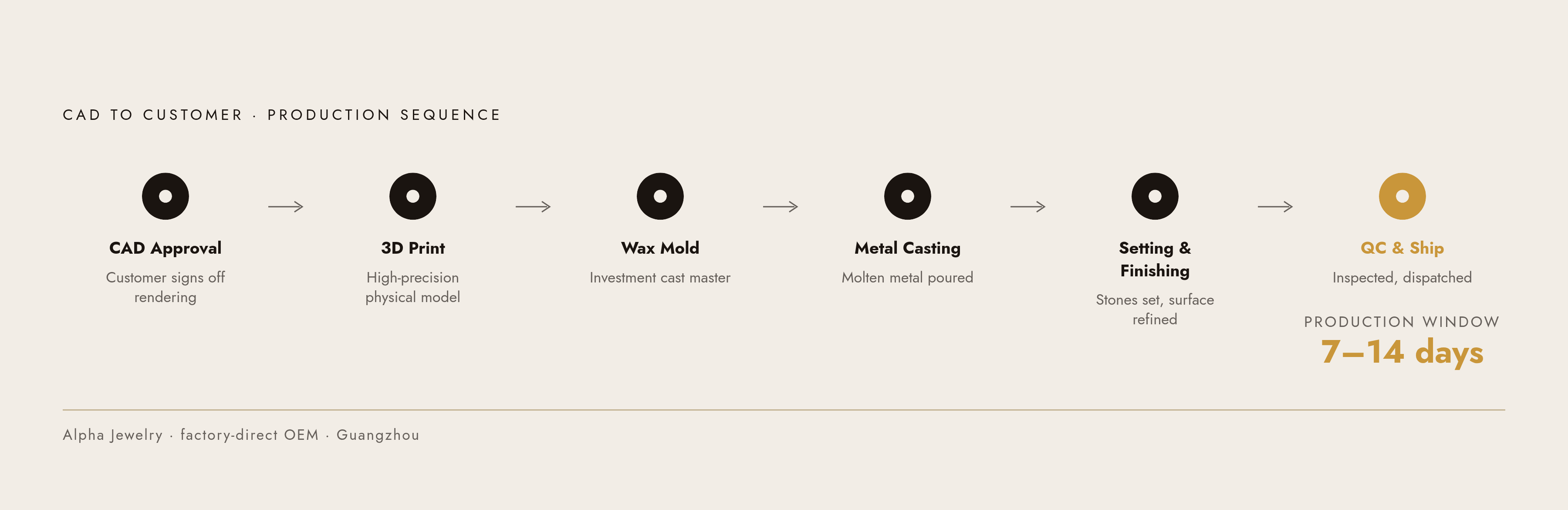
Customer hits approve. What happens next used to be the part of the process that made "custom" synonymous with "slow." That's no longer true in the same way, because the path from CAD file to finished ring has compressed enough to work as a real made-to-order business model rather than a special favor granted to patient customers. The route itself is mechanical and fairly linear: approved CAD file, then a high-precision 3D print of the physical model, then a wax mold, then casting in whatever metal the customer picked, then setting, finishing, and quality control. Before any metal gets touched, the customer sees a photorealistic 3D rendering of the finished design, and only once that's approved do high-precision printers build the physical model and generate the wax mold that keeps the final cast ring faithful to what was approved on screen. Alpha Jewelry, a factory-direct OEM manufacturer based in Guangzhou, offers a concrete picture of what this looks like in practice: clients typically approve a CAD rendering and then wait somewhere between 7 and 14 days for production, depending on how complex the design is. That CAD file doesn't disappear once the ring ships, either. It becomes a permanent record a brand can return to, reuse, or adapt for future collections without starting the design process over from nothing. One customer's custom ring turns into a template the business can build on. All of this rests on one hard requirement: what the customer approved on the product page has to match what comes out of casting, exactly. Any daylight between the rendered image and the production geometry turns into returns, disputes, and damage to trust that erases whatever conversion gains the configurator produced. That's the argument for building configuration, parametric CAD, and manufacturing output as one connected system instead of three separate tools stitched together. A rendering tool, a separate CAD tool, and a separate manufacturing handoff each introduce their own chance for the design to drift from what was promised, and a unified platform closes those gaps by design rather than by hoping everyone stays careful. That sets up a fair question: once the output requirements are clear, what platform choices actually make this possible?
The technology stack that runs a ring configurator in a browser
Every browser-based ring configurator rests on the same foundation: WebGL. What sits on top of that foundation, the e-commerce platform, the configurator app, or a fully custom build, decides how much of the pricing and parametric logic can plug in without custom engineering work. WebGL itself, usually accessed through JavaScript libraries like Three.js or Babylon.js, is what renders interactive 3D graphics directly inside a browser, letting someone rotate a ring and customize it in real time with no plugin required. That statement folds into the sentence before it. The platform on top of it determines the budget and the ceiling. Shopify stores can lean on third-party apps like Zakeke or Angle 3D Configurator for plug-and-play 3D customization. BigCommerce is worth consideration for heavier customization or wholesale/B2B alongside retail, since more of that capability is built into core plans, though the full B2B Edition is available on the Enterprise and Performance tiers. Cost scales with ambition. A solid Shopify build for an independent jeweler runs in the low thousands of dollars. A fully custom agency build, the kind with a ring configurator, AR try-on, and live pricing all working together, runs into the tens of thousands. Enterprise builds with custom configurators, ERP integration, and multi-region support cost more still, and these ranges hold up as realistic across the tiers. Layered on top of general platforms, there's a growing set of AI tools built specifically for jewelry rather than adapted from general-purpose image or 3D software, and that distinction carries real weight: jewelry-specific platforms already encode things like stone seat dimensions, prong styles, and setting types, logic a generic platform would need custom engineering to replicate from scratch. Diatech Studio is one example, offering natural language design search, AI-generated 3D models from design images on its Enterprise tier, instant photorealistic renders, and automated bill-of-materials estimation, covering the workflow from concept through cost estimate. Tashvi AI takes a similar end-to-end approach, combining a guided design mode, prompt-based creation, material estimation straight from 2D renders, and photorealistic output built for client presentations, with that material estimation step doing the useful work of tying creative exploration to business reality in one move. The strongest architectural position is the one that unifies parametric CAD, configurator logic, pricing, and production-file output under one roof, because that's what closes the gap between a pretty picture and a buildable ring. A platform that stops at rendering hands the problem back to a separate CAD handoff, and that handoff is exactly where drift risk creeps back in.
AI and the Front Half of the Configuration Process
AI's biggest impact on this whole process appears early, at the concept and variant stage, where it turns what used to be a multi-day back-and-forth into something that takes minutes, and that shift changes the math on whether offering custom configurations at scale is even affordable. The old bottleneck had four parts: client briefs that leave out half of what matters, sketching that happens one direction at a time instead of several at once, revisions that cost real money because every change burns skilled hours, and approvals that stall because the client can't picture the finished piece from a sketch. AI-assisted workflows chip away at all four of those problems in order. Instead of committing to one design direction and hoping it lands, a jeweler can generate several at once (solitaire, halo, vintage, different band profiles, different stone shapes) so the customer converges on what they actually like faster, rather than settling for the one option they were shown. Once a direction is picked, changes come fast too: keep the setting, thin out the band, swap the metal, change the stone shape, all without restarting the CAD process from zero. Clients also get to see presentation-ready visuals before CAD modeling even begins, which cuts down on the back-and-forth that used to happen once real CAD work was already underway. That earlier visibility catches a mismatch between what the client pictured and what the designer built at the concept stage, long before it turns into a wasted CAD cycle. None of this replaces the CAD modeler, and the sources are clear on that point: AI accelerates the common, repeatable tasks, while the final engineering work, the stone seats, tolerances, prong thickness, and weight balance, along with real-world concerns like comfort, durability, and how a clasp actually behaves, stays human craft. It's also important to be precise about which AI tools belong in this workflow at all. General-purpose image generators like Midjourney, GPT Image 2 (formerly DALL·E 3), and Leonardo AI can produce genuinely striking images, but they don't account for manufacturing constraints at all, which keeps their role conceptual rather than production-ready, and means they can't function as the AI layer of a real configurator without a separate CAD handoff sitting behind them. The jewelry-specific tools built with stone seats and prong geometry baked in are doing a different job entirely, and it's that difference that decides whether an AI-generated concept turns into a ring someone can actually wear.
Sources
- 7 Best AI Jewelry Design Tools in 2026
- AI vs Traditional Jewelry Design: 2026 Workflow Guide
- Top 10 AI Tools Every Jewelry Designer Should Know in 2026
- How AI Is Transforming Jewelry Design in 2026 - feelstylejewelry
- Manufacturer Ring Guide
- 7 Best AI Jewelry Design Tools in 2026
- Web-Based 3D Configurator for Jewelry &
- Jewelry Ecommerce Development: Complete Guide 2026