Design Asset Management for Jewelry Brands With Large CAD Libraries
Finding the right CAD file in minutes, not hours, determines a jewelry brand's design margins.

Jewelry brands don't have a creativity problem. They have a filing problem. Past a few dozen SKUs, the bottleneck is no longer design talent, it is finding the right file in under five minutes. A structured system for managing CAD assets turns that mess into something a team can actually run a business on.
Scale is what breaks first. A single ring style doesn't exist as one file. It exists as a stack of them: every stone size, every metal option, every configuration variant spins off its own version. One SKU can easily generate dozens of CAD files once you count size runs and metal swaps. Across a full seasonal line, the library grows faster than anyone's naming habits can keep up with.
There's a specific point in the jump from boutique to mid-market, or mid-market to something bigger, where this starts costing real money. Below that line, a designer can usually remember where things live. Above it, memory stops scaling. Files get duplicated because nobody could find the original. Version conflicts creep into manufacturing. A customer asks for something built two years ago, and the search for it eats an afternoon.
Time spent searching, rework from pulling outdated files, and scrap from errors eat margin, even though none of that appears directly on a balance sheet. Time spent searching is time not spent designing. Pulling an outdated file means rework, or worse, a batch of scrap metal. Custom work, a segment growing at a strong pace in 2025, only multiplies the number of configurations a brand has to track, and that volume doesn't wait around for anyone to get organized.
Two brands doing the exact same volume of custom work can post wildly different margins, and the gap between them is entirely operational. One pulls a validated shank file and reconfigures it in minutes. The other rebuilds the same geometry from scratch every single time, ring after ring, month after month, like it's the first time anyone's ever asked for a size 7 in rose gold. That gap is the whole argument here: a library's value comes down to how fast someone can actually use what's sitting inside it.
What a jewelry CAD library contains and why it resists simple folder structures
A working jewelry CAD library holds more than finished designs. There are component pieces (shanks, prong heads, bezel cups, pavé strips, bail types), stone seat files keyed to a specific cut and carat weight, size variants, metal-specific versions (wall thickness has to change with metal density), and a revision history trailing behind almost every one of them.
Folders don't hold up under that load, and pretending they will is the first mistake most brands make. A single ring is simultaneously a style, a stone type, a metal, a size, and a configuration, all at once. A folder tree that tries to capture all four of those dimensions either forces a duplicate of the file across multiple folders or buries it somewhere nobody thinks to look. Folders handle one hierarchy at a time. Jewelry files need four, sometimes five, which is basically asking a filing cabinet to also be a spreadsheet.
Parametric modeling makes this weirder, in a good way. A parametric file where band width, prong height, and stone seat are all live, adjustable variables is a whole family of possible outputs waiting to happen. Store only the flat exports, and the editability that made the parametric file worth building disappears with it. RhinoArtisan's writeup explains that without a parametric workflow, every customer revision means additional modeling work. With parametric design, that same change happens in seconds. The library has to track states, not just files, because the file is really a hundred files pretending to be one.
Version control failures happen routinely, not hypothetically. A file sitting on a shared drive named "ring_final_v3_FINAL_USE THIS" isn't a joke, it's a liability, and it ends up at manufacturing when it shouldn't.
The most expensive habit hiding in most libraries is what doesn't get reused. Standard pavé strips, basket settings, common ring shanks get rebuilt from zero on every new project instead of pulled from a tested, curated set sitting right there in the library. Fixing that won't make the underlying complexity go away. But it makes the complexity navigable enough that a designer can move through it fast, instead of starting over every single time like it's day one.
Naming conventions and metadata as the foundation of a retrievable library
A file nobody can find in under a minute might as well not exist. Naming conventions are the infrastructure that makes a library searchable at all, and skipping this step is the single most common reason libraries collapse under their own weight.
A naming convention for jewelry CAD needs to encode the same facts, in the same order, every time: collection identifier, style number, metal type, stone type and size, configuration or variant tag, and revision number. COLL-STYLE-METAL-STONE-SIZE-REV is one workable structure. A Spring/Summer 2026 ring, style 104, in 18-karat yellow gold, with a 1.00-carat round brilliant, revision two, becomes SS26-R104-18YG-RB-100-v2. Anyone on the team can read that string and know what they're opening before the file even loads.
Filenames can only carry so much, so metadata picks up the rest. Tags for manufacturing method (cast versus printed), setting type, designer, approval status (concept, approved, production-locked), and last-used date let a team filter and search in ways folder browsing never could. Whether a file is a live parametric source or a flat, static export affects whether a designer can actually edit it later. Grab the wrong one, and a designer either can't edit what they thought was editable, or ends up working off a dead-end export without realizing it until it's too late to fix cheaply.
None of this holds up without ownership. Somebody has to own the convention, train new designers on it, and set the rules for what happens when a file arrives from an outside CAD contractor with none of this applied. Left unmanaged, that intake gap is exactly where compliant naming quietly falls apart, one unlabeled file at a time.
Timing matters too. At a few hundred files, inconsistent naming is a mild irritation, the kind of thing you grumble about over coffee. At a few thousand, it turns the library into a pile of assets nobody can search. The earlier a convention gets locked in, the less cleanup debt piles up later, and that debt compounds fast, the way any unpaid bill does.
Structuring a component library that pays compound returns across collections
An archive and a component library get treated as the same thing, but they are not the same thing. An archive is a record of what got made. A component library is a set of reusable, tested, production-validated building blocks designers reach for first, before they even consider modeling something new. Confuse the two, and a brand ends up sitting on thousands of old files and zero shortcuts.
What earns a spot in the library: stone seats already validated for specific cuts and carat weights (prong, bezel, channel, pavé), ring shanks sorted by metal and wall thickness, bail types, clasp mechanisms, standard chain link geometries, and whatever signature elements recur across a brand's collections.
Validation is what actually protects the business here. A component that's earned its place in the library has already been through manufacturing: wall thickness checked, stone seat dimensioned correctly, shrinkage allowance built in. Pulling that file isn't just quicker than starting fresh, it's safer, because someone already caught the mistakes that would've shown up in casting, usually the hard way.
Some of that checking still can't be automated. Neural4D's report notes that wall thickness verification, sprue attachment, and shrinkage scaling remain manual steps even now. A validated component library is the practical workaround for that gap. Building the check once and storing the result lets every future project skip redoing the same manual work.
Manufacturing method needs to be tagged clearly, too. A component built for 3D printing isn't interchangeable with one built for lost-wax casting. A library that blurs that line is setting someone up to send the wrong geometry to the wrong process, and nobody finds out until the pour.
The payoff compounds the longer this runs. A pavé strip validated once in a spring collection gets pulled again for the fall line, then again the year after. A brand sitting on 200 validated components builds a new collection faster than a competitor starting from a blank screen every time, and that speed gap widens with each season. Still, a component library isn't a museum. Some pieces stop being good enough, whether the manufacturing standard moved past them or the aesthetic just aged out, and a library needs a real retirement process instead of letting stale components linger and get pulled by accident.
Version control and approval workflows that keep manufacturing from receiving the wrong file
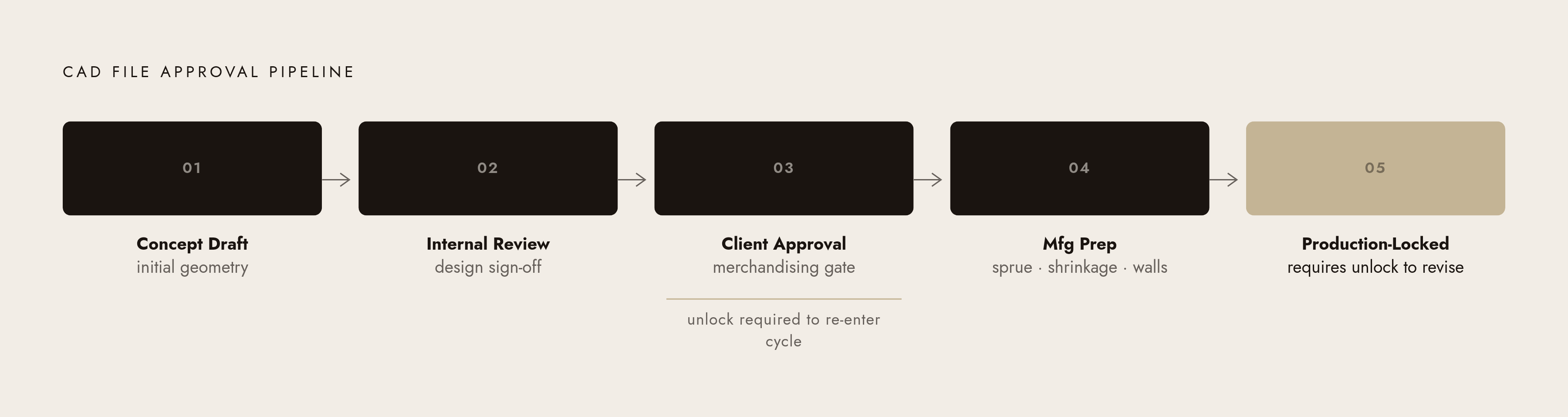
The failure this section exists to prevent is simple to describe and expensive to live through: a modified file quietly overwrites the production-approved one, a team member grabs the concept version instead of the manufacturing-locked file, or a contractor sends back a revision with no record of what actually changed.
A jewelry CAD file should move through distinct, named stages, not silent overwrites: concept draft, internal review, client or merchandising approval, manufacturing prep (sprue placement, shrinkage, final wall check), and production-locked. Each stage is its own version, sitting on its own, not a save-over of the last one.
"Production-locked" needs to mean something concrete: a file state that can't be edited without someone deliberately unlocking it and kicking off a new approval cycle. The file that goes to casting or printing should never be the same file a designer is still fiddling with on their desktop at 11pm the night before.
Access control does most of the enforcement work here. Designers get write access to working files. Production-locked files go read-only for everyone except whoever owns that approval gate. It's a simple rule, and it closes most accidental overwrites on its own, no drama required.
External contractors complicate all of it. Freelance CAD modelers or offshore production partners deliver files named under someone else's convention and versioned by someone else's system. Intake protocols, renaming, adding metadata, assigning the correct version, matter just as much as whatever system runs internally. The whole convention breaks the moment an outside file enters the pipeline if that step is skipped.
This isn't a jewelry-specific headache. The broader digital asset management market was worth $6.23 billion in 2025, growing at 15.4% a year, pushed along by AI and sheer content volume. Jewelry brands are one specific case of a much larger need across every industry: controlled, auditable asset workflows. Getting that audit trail right pays off the day something goes wrong. When a manufacturing defect appears, tracing exactly which file version got used, and who approved it, makes the fix quick or turns it into a mystery nobody can close out.
Choosing the software environment where a large jewelry CAD library lives
Brands generally land on one of three setups. Some manage the library inside the design software itself, using its native project structure and component tools. Others run a separate asset management layer sitting above multiple design tools at once. A third group ties everything into ERP or manufacturing software for traceability from design straight through to the factory floor. Of the three, native storage is the easiest to start with and the first one a growing brand outgrows.
Native, design-application libraries have one clear advantage: they cut out the translation step between "the asset is stored" and "the asset is actually usable." A handful of platforms come up repeatedly across industry sources. MatrixGold is at the top, built around parametric CAD and CAM for professional jewelry design, rendering, and manufacturing prep. 3Design ranks second, combining parametric modeling with CAM export, and boasts over 5,000 customers worldwide. Gemini CAD comes in third, a full CAD/CAM system built for manufacturing workflows from concept through CNC machining. 3Shaper ranks fourth, focused on direct modeling for fast prototyping and detail work. Mjölnir Jewelry CAD sits fifth, a parametric tool aimed at precise modeling and production tooling. JewelCAD rounds out the list at sixth, a longstanding NURBS-based system with rendering and manufacturing support built in.
RhinoArtisan stands apart from that list. Its own materials describe it as combining parametric CAD, stone-setting tools under the name GemSet, real-time photorealistic rendering, AI image and video generation, and manufacturing and retail workflow integration in one platform. Its 7.0 release, out September 18, 2026, was billed as "The AI Release," and folded Claude into the platform directly for design work.
A newer category of web-based, AI-native platforms doesn't require traditional CAD training to operate. That matters for library access specifically, because it opens the door to designers, merchandisers, and reviewers who'd never touch a traditional CAD modeler but still need to search and pull from the library. Platforms in this category report over 90,000 users, which says the working audience for jewelry design tools now reaches well past specialist CAD operators.
Parametric design has a second benefit that's easy to miss: it shrinks the library itself. A ring shank with variable width and thickness lives as one master file, not dozens of separate flat exports for every size and width combination. Fewer files, more retrievable configurations. That's not a minor efficiency. It changes how big the library needs to be.
Bigger operations with libraries spread across multiple CAD applications usually need a dedicated DAM layer sitting above all of it, pulling files in from different sources, applying one consistent metadata standard, and serving as a single search point for everyone. That $6.23 billion DAM market figure reflects how many organizations, jewelry brands included, have hit this same wall.
The connection to manufacturing planning matters just as much. Jasperops reported that switching to a jewelry manufacturing software system can save 30% of production planning time compared to running things off spreadsheets. A CAD library that plugs straight into production planning closes the gap between "found the file" and "the order is actually moving."
How AI changes retrieval and reuse at scale
Keyword search runs out of road once a library hits a few thousand files. It's necessary, but not enough on its own, especially when a designer is trying to recall the exact tag someone slapped on a pavé band file back in 2022 and can't quite place it. AI-assisted search, whether semantic, visual, or plain natural-language query, finds the relevant file anyway, without demanding perfect metadata recall from a human brain that's already juggling six other things.
Visual similarity search is the clearest example of this working in practice. A client sends a reference photo, and the system pulls back the five closest geometric matches already sitting in the library. A task that used to eat an hour of digging through folders turns into something that takes seconds, which is either magic or just decent software, depending on how tired the designer is that day.
AI generation fits into this picture as a complement to retrieval. The more useful application for a brand sitting on a large library is generating variations on components that are already validated: a new band profile derived from an existing library shank, a new setting built off a library bezel. That keeps the manufacturing validation intact while speeding up how fast new ideas get explored.
Neural4D's report found that AI 3D jewelry modeling can turn a text description or reference image into 3D mesh geometry in under two minutes, cutting out what used to be days of manual modeling, and that design-to-market cycles on AI-equipped production lines have compressed from 6 to 8 weeks down to 2 to 3 weeks. None of that speed sticks, though, unless the AI output actually gets checked against the existing library and folded into it, rather than treated as some standalone artifact floating outside the system.
The same Neural4D report points to a hybrid standard emerging: AI for speed, human judgment for manufacturing precision. Inside a library, that plays out as AI surfacing candidates and spinning up variations, while a human still signs off on manufacturing validity before anything gets promoted into the component library proper.
There's research pointing further out, too. A paper from Adler, Russo, and Cafarella presented at CAIS '26 in May 2026 describes agentic systems that generate, visualize, and refine CAD models in a feedback loop, and introduces a prototype called AADvark aimed at dynamic assemblies with moving parts. The implication for library management down the line: an agent that queries the library, pulls a base component, and proposes a modification, with a human still sitting at the approval gate.
That gate isn't going anywhere. Deciding which file gets production-locked, which component gets retired, who signs off on a revision, that's still a human call, full stop. AI speeds up the work happening inside those checkpoints. It doesn't move the checkpoints themselves, and any brand betting otherwise is setting itself up for a very expensive casting mistake.
Building a library governance structure that scales from a small team to an enterprise operation
The governance setup that works for a two-person design studio isn't going to hold up for a brand running design teams across three continents. The scale changes. The underlying principles mostly don't. They just get more formal as headcount grows, the way a lemonade stand's cash box eventually turns into an actual accounting department.
For a small team, somewhere between one and five designers, governance can stay lightweight without falling apart. The naming convention lives in a shared reference doc, enforced through habit and a bit of peer review. One component library folder does the job, with a short validation checklist attached to each entry before it gets added. Version control runs on one simple rule: never overwrite, always increment, and production-locked files get moved somewhere separate with restricted access. AI tools speed up retrieval and variation work, and one designer ends up owning library hygiene as an unofficial but very real responsibility, the kind nobody puts on a job title but everyone quietly relies on.
Mid-market teams, somewhere in the five-to-twenty-designer range and often spread across locations, need more structure baked into the system itself. Relying on habit stops working at this size, so the naming convention gets enforced through intake scripts or templates built directly into the design platform instead. The component library carries formal approval-status tags, and a designated library owner has actual authority to promote a component in or retire one out. Version control ties into the design software directly, or runs through a lightweight DAM layer, with a defined intake protocol for anything arriving from outside contractors. And the library connects to manufacturing software, closing the loop between what's stored, what's approved, and what's actually in production.