Starting a Custom Jewelry Business From Home With AI Design Tools
AI tools now handle the expensive design phase that used to require trained experts.
Starting a custom jewelry business from home is now realistic for people with no design background, because the thing that used to block them had nothing to do with talent. The real barrier was infrastructure: CAD expertise, a design team, and iteration cycles long enough that only a funded studio could afford to run them. A trained CAD artist, a rendering studio, and days of back-and-forth before a client saw a single image, that was the standard setup, and Diatech Studio's 2026 guide documents how slow and expensive that front half of the process used to be.
That front half, brief to approved concept, was also the most skill-dependent and costly stretch of the whole job. Every revision ate skilled hours, and a studio could only really explore one direction at a time before showing a client anything. What's changed isn't a minor efficiency gain.
The AI-assisted design workflow, step by step
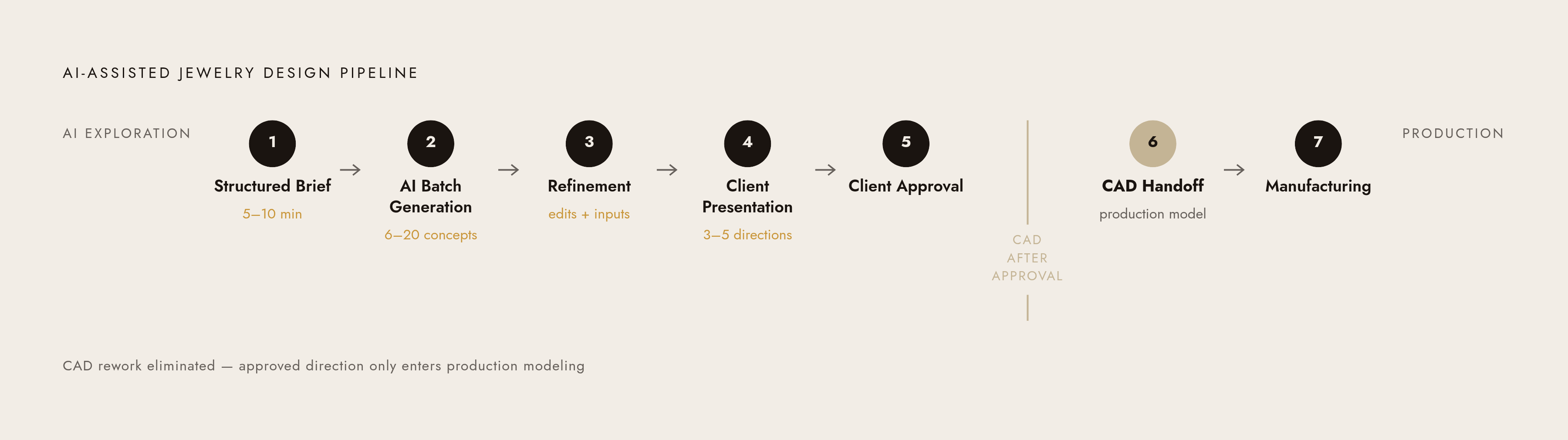
The AI-assisted workflow doesn't just speed up the old process. The costly CAD phase only starts after a client has already said yes to a direction. Everything that used to happen through slow, sequential sketching now happens in one sitting, before any modeling software opens.
It starts with a structured brief, something that takes five to ten minutes and covers piece type, occasion, deadline, budget, style keywords, material preferences, sizing, and lifestyle constraints. A complete brief at this stage matters because it heads off the kind of late-discovered misalignment that has killed plenty of traditional projects, the kind where a client says "wait, I wanted rose gold" three rounds in. From there, the AI generates a batch of concept directions, often anywhere from 6 to 20 in one session, covering solitaire versus halo versus vintage settings, different metals, and different stone shapes, all explored together in one sitting. Once a few directions stand out, refinement happens in plain language. A founder can say "keep this setting, thinner band, switch to white gold, add a halo," and the AI updates the design directly. Diatech Studio's guide also describes targeted editing, where a founder selects one specific region of a design and changes only that part, leaving everything else untouched, and reference inputs aren't limited to typed descriptions either: a hand-drawn sketch, a reference photo, or an existing design can all be uploaded and used to generate variations. With three to five polished directions in hand, the next step is presenting them to the client, who tends to decide faster looking at real images than trying to picture something from a verbal description. Only once a direction gets approved does CAD handoff happen, and production modeling begins, resulting in less rework and a lower cost per project overall.
AI handles the exploration, but CAD still exists as a real, necessary phase. It hasn't been replaced. It's been moved to the end of the line, where it belongs, once the guesswork is already settled.
Which AI design tools are worth using
The tools available in 2026 fall into two camps: ones built around actual jewelry logic, and ones borrowed from general-purpose image generation. Picking the wrong one for the wrong phase doesn't save time, it just moves the cost somewhere else, usually into a correction cycle later.
Pencil Design is an AI-powered jewelry design and commerce platform built specifically for production-ready output. It generates CAD-exportable designs, supports parametric configuration, and connects design directly to manufacturing without requiring any CAD expertise from the founder running it. It's suited to founders who want one platform covering concept through commerce, with a wide range of customization built in, and it covers the full workflow rather than stopping at the ideation stage the way most of the field does.
Diatech Studio is trained specifically on jewelry imagery, so it understands terms like "cathedral setting," "baguette accent stones," "milgrain border," and "oxidized silver" in a way general tools simply don't. It supports sketch and reference image input, iterative refinement, and a technical specification mode built for CAD artists, and its 2026 guide documents batch generation aimed at studios managing higher volume.
DALL·E 3 is the easiest entry point for early brainstorming. Its conversational interface through ChatGPT makes quick "what if" iterations painless and genuinely useful for communicating a rough idea to a client before committing to a direction, though it isn't jewelry-specific and tends to get technical details wrong.
Stable Diffusion, paired with fine-tuned models, offers the most control for anyone with the technical skill to use it. It allows custom model training on a brand's own jewelry dataset and runs best on GPU hardware or cloud computing (CPU-only use works, but slowly enough to test patience). It has no built-in jewelry intelligence without that custom training. It's open source, meaning free in dollars but not in learning curve.
The real dividing line across all four is whether the tool understands how jewelry is actually built. A general image generator can produce something gorgeous that no caster on earth could turn into metal, and fixing that after the fact costs more than just starting with a tool built for the job.
Getting from an approved AI concept to a production-ready file
An AI-generated image and a production-ready CAD file look similar on a screen and are not the same object. Knowing that difference early is what decides whether a home-based business can actually fulfill the orders it takes.
CAD software produces manufacturable 3D models built to precise tolerances. AI design tools produce visualizations, pictures that communicate an idea, not geometry a caster can trust. The two aren't competing for the same job, they're two phases of the same job, and skipping from one straight to production is how a founder ends up with a ring that looks perfect and cannot physically be cast. Shrinkage is one reason why: metal shrinks as it solidifies, so a digital model has to be scaled up before printing, or routed through a service that already handles shrinkage compensation as part of its process.
The objection most founders raise at this point is predictable. "I can't afford CAD conversion on every order." Fair worry, and the answer is that parametric platforms like Pencil Design generate the production file automatically per configuration, so the conversion cost lives inside the platform instead of getting billed separately on every single piece. That's the path that scales. A founder taking fifty orders a month can't realistically commission fifty one-off CAD conversions, but a platform producing the file as a byproduct of the design process itself removes that bottleneck entirely, and it's the direction the rest of this article builds toward.
What a configurator lets a home-based business sell
A configurator turns the whole AI-plus-CAD workflow into something customers can use themselves, without a founder sitting on every call walking someone through options. That shift, from founder-run consultation to self-service design, is what actually lets a one-person operation behave like a much bigger business.
A custom jewelry configurator lets a buyer design their own piece online and walk away, in one session, with a quote, a bill of materials, and a CAD-exportable file. The order goes straight into production with no manual handoff sitting in between. For that to work without generating unfillable orders, the configurator needs a rules engine running underneath it, blocking invalid combinations before a price ever appears. A bezel setting that physically cannot hold the stone diameter someone picked, for instance, needs to be ruled out automatically. That's what keeps the whole thing honest instead of turning into a source of refunds and apology emails.
The upside here is real for inventory, too: a configurator lets a home-based seller offer hundreds of ring combinations from a single parametric template without holding a single physical item in stock, each one priced correctly the moment it's configured. In bridal specifically, a "design your own" builder has gone from nice-to-have to something buyers increasingly expect to see, the way free shipping did a decade ago.
Pencil Design combines AI design, production-grade CAD output, and a website configurator into one product, so every design a customer configures on the site matches the exact CAD file that eventually goes to casting. That's built for home-based founders who need every layer of this stack without commissioning custom development from scratch. For founders who already run a Shopify store and want just the configurator layer bolted on, third-party apps like Zakeke or Angle 3D Configurator offer plug-and-play 3D customization without a developer on payroll.
Custom-built configurators do exist, at two distinct price points. An entry-level build, covering a focused product range with real-time rendering and basic e-commerce integration, runs $20,000 to $60,000 based on 2026 industry data, while premium luxury builds add ultra-high-fidelity rendering, AI-powered recommendations, and bespoke CRM integration on top. Both are later-stage investments, not something a launch needs on day one. The common objection, "this sounds like it's only for big brands," doesn't hold up once the platform tier is on the table. Platforms like Pencil Design make the configurator layer accessible without a development budget at all, and the Shopify app tier covers founders who already have a storefront running and just need the customization piece added.
Building a product page that converts browsers into custom jewelry buyers
A configurator sitting on a product page isn't enough on its own. What surrounds it decides whether a browser trusts the purchase enough to actually click buy, the way a well-built store window still needs a convincing salesperson standing behind it.
A product page that converts tends to share a specific set of components. A clear headline with real keyword relevance appears in search results. A short emotional hook that explains why the piece matters, not just what it's made of. Detailed technical specifications, so a buyer knows metal purity, stone details, and construction without having to ask. Certification documentation, GIA, IGI, or AGS grading reports, linked directly to the product rather than buried three clicks deep in a general policy page. A sizing guide that removes the guesswork. Clear delivery timelines, since custom pieces take longer than off-the-shelf ones and buyers need to know that upfront. Returns and warranty language that reassures buyers. An FAQ section catching the objections before they become abandoned carts. High-quality lifestyle imagery showing the piece on an actual hand or neck, not just floating on white.
Certification placement affects whether a buyer trusts the purchase enough to click buy. A grading report linked straight to its product gives a buyer something concrete to check against a real purchase, while the same document sitting on a general policy page reads like fine print nobody asked to find. For a custom piece, where the buyer can't walk into a store and hold it before paying, that direct link is often the one detail standing between a browser and a buyer.