AI CAD Drawing Generators for Jewelry Compared
Image, mesh, parametric, or storefront: pick the layer that matches your next step.

AI CAD drawing generators for jewelry are not one category. Some produce pictures, some produce printable meshes, and some support editable designs or a working storefront. The right choice depends on what still needs to happen before casting. A beautiful ring image is useful, but a printer cannot run on good intentions.
Why the layer a tool works at determines the work still ahead
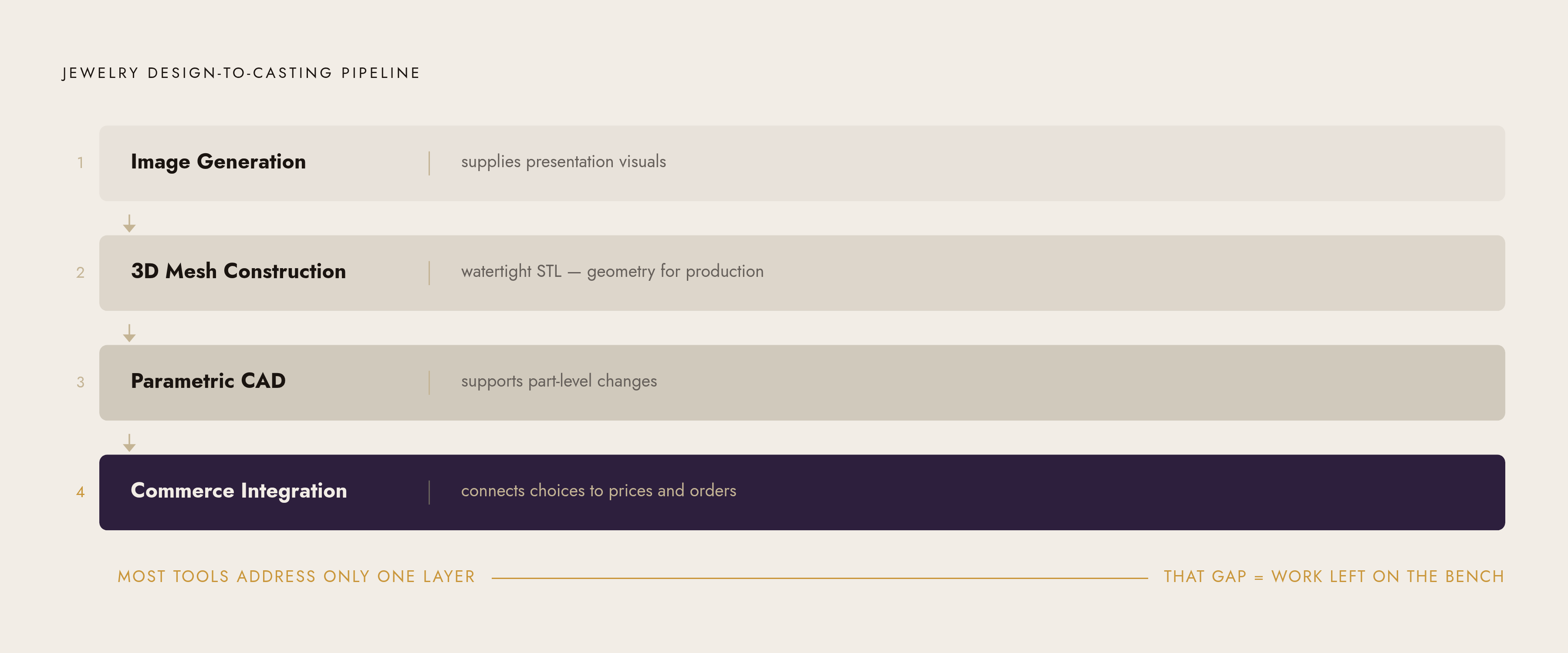
The design-to-casting pipeline has four distinct layers, namely image generation, 3D mesh construction, parametric CAD, and commerce integration. Most tools address one layer. An image supports a presentation, while a watertight STL mesh supplies geometry for production. Editable parametric CAD supports changes to the design, and a commerce-integrated model lets customers configure and buy it. These outputs solve different problems, despite often sharing the same “AI design” label.
That distinction determines the work left on the bench. A concept image still has to go through a full 3D modeling step before printing or casting can begin. A frozen mesh gets closer, but it needs validation and does not offer the part-level changes available in parametric CAD. Commerce adds another requirement, connecting choices about the design to prices and orders. Buying a tool at the wrong layer leaves downstream work for someone else.
What general image generators actually produce and where that stops
Midjourney and Leonardo AI make concept renders that work well for mood boards, collection direction, and client presentations. ChatGPT Image works at the same image layer, helping show what a proposed piece might look like. Adobe Firefly and Stable Diffusion also belong in this group. All five support visual exploration before technical development begins. None produces geometry, a mesh, or a file a printer or caster can use.
That is a useful job in its own right. With general image generators, a client can quickly see and react to 20–30 visual directions in a session before detailed modeling starts. The difficulty comes when the discussion shifts from appearance to specification. Prong counts can drift between generations, stone arrangements can move, and a small requested change can reinterpret the whole piece. “Just change the setting” can become a surprise redesign.
The problem is structural. These generators learn appearance. They may depict a bezel setting or a prong setting without modeling how it holds a stone, what wall thickness it needs, or how it survives casting. A bench jeweler therefore has to interpret the image before building from it. However polished the render, the geometry still has to be made.
How AI-to-mesh tools close the gap to printing and casting, and where the gap reopens
AI-to-mesh tools move beyond the picture by turning a prompt, sketch, or reference photo into a watertight STL in minutes. That compresses the path from an idea to geometry, which otherwise involves manual CAD work. STL supports 3D printing and milling, so the output can enter a workflow that an image cannot. JewelArchitect offers sketch-to-STL generation through credit packs from $29, using a pay-as-you-go approach.
A printable file is not automatically a castable design. Human review still needs to cover wall thickness, stone-seat geometry, sprue positioning, and manifold checks. Models trained on photographs of finished jewelry learn what finished pieces look like, rather than the tolerances embedded in production CAD files. The preview is not a bench inspection.
A frozen STL does not preserve the part-level controls needed to resize a shank, swap a head, or rebuild one component without starting over. Other handoffs also need different formats, including OBJ for tools that do not read 3DM and GLB for web viewers and configurators. Mesh generation thus supplies the geometry, but the mesh may still be hard to edit. That is where parametric CAD enters.
What editable parametric CAD adds and what it costs to get there
Editable parametric CAD preserves control over the design. It allows changes such as resizing a ring, swapping its head, or altering its prong count without rebuilding the entire file. This is the practical distinction behind requests for editable 3DM files. The file is a working manufacturing document. A frozen mesh can describe the shape, but it does not supply the same editing structure.
Traditional jewelry CAD options include MatrixGold, 3Design, and RhinoArtisan. The stated cost for 3Design is ~$6,900 or subscription, while RhinoArtisan includes agentic AI in version 7. Comparable prices are not supplied here for the other tools. Money is only part of the commitment, though. A professional CAD modeler takes 8–16 hours for a single custom ring, and reaching that level requires years of training.
That time pays for more than drawing a ring-shaped object. Jewelry-specific construction logic accounts for stone-seat geometry, prong wall thickness, and shrinkage allowances for casting. These details make it possible to manufacture a form that looks good. With a frozen mesh, the same concerns remain tasks for manual cleanup and validation.
Why the hybrid workflow — AI for iteration, parametric CAD for the edit — wins on both cost and quality
The hybrid workflow assigns each kind of work to the layer suited to it. AI handles early ideation and mesh generation, while parametric CAD handles changes that need editable construction. Tools spanning both layers reduce the handoff between them. The hybrid workflow is a way to spend less modeling time before deciding which designs deserve detailed engineering.
AI CAD alternatives cost a fraction of traditional license fees and take less training, so a hybrid stack can cut yearly CAD costs compared with using Rhino/MatrixGold alone. Parametric tools are still there for changes that need them. Faster early modeling also leaves room to explore and validate more directions before detailed CAD work begins. The objection that AI learns appearance rather than engineering supports this combined approach.
RealCADBench provides research context for why that engineering judgment cannot be reduced to a good-looking output. The benchmark finds that executability, geometric overlap, and visual-semantic identity do not move together across models and agents. The highest composite score comes from a different model than the leaders on individual measures. The same failures keep coming up: fine structures are missing, part identity is lost, and assembly placement is wrong. It shows why agentic CAD needs sound reasoning as well as plausible geometry.
Tools that extend beyond CAD into jewelry-specific design control and production handoff
Jewelry-specific tools narrow the gap between a visual idea and a manufacturing handoff by working with the needs of jewelry. These tools have controls for stone settings, component libraries, and casting-aware geometry. However, specialization alone does not establish what a tool exports. A consultation brief and an editable model can both be useful jewelry outputs, but they serve different stages.
Pencil Design offers a jewelry-specific route from a sketch or prompt to production-oriented STL at $39/month, with a free start available. Its parametric CAD backend also supports resizing and part-level edits. That places the platform across more than one design layer. Its stated STL output should not, however, be read as a promise of every other export format. Backend editability and published file exports are separate questions.
HeyGema works earlier in the process, capturing the call with the client and making concept sketches and a PDF spec brief. It does not output a 3D file. Starter costs $20/month, with a Pro plan available, a discount on yearly billing, and a 15-day trial. It can pair with another tool for geometry and production. That makes it a consultation aid rather than a replacement for CAD.
Other multi-layer options include Ruby Kinglet, with native 3DM and a storefront, and Tashvi AI’s beta Parametric Studio, with STEP/STL and a casting check. Their roles extend beyond concept imagery. By contrast, FormaNova uses per-CAD-generation credits, but its output format is unconfirmed in the supplied information. That format needs verification before purchase.
The commerce layer — configurators and live pricing as the fourth stage of the pipeline
For a retailer, a castable file is not the last stop. Customers also need to configure the piece, see the price, and check out. Most CAD tools, whether AI-based or traditional, do not supply that commerce layer. Geometry alone does not operate the till.
Live pricing is central to that experience because metal, stone, and carat selections each change the cost. A diamond feed that updates overnight also needs to be reflected in the quote. Otherwise, an earlier price may fall short of the stone’s new wholesale cost. This is more than a display feature. The configurator has to connect design choices with current commercial information.
The jewelry platform described above has native integrations across five platforms and a headless API so it can work with the different technology stacks retailers use. Ruby Kinglet includes an embeddable storefront on its top-tier plan, serving commerce from the same workspace that generates its 3DM. These approaches connect the design workspace to sales without leaving the retailer to do the integration work. A configurator that fits the retailer’s existing setup has a different practical value from one that requires additional development before customers can use it.
In-store tools that bring the same pipeline to the sales floor
An associate working with a client needs to move from concept to configuration and price without breaking the workflow. In-store display configurators can run on the same platform as web builders, allowing associates and online customers to use the same tool. That keeps the work on one path from the sales floor toward casting.
However, a shared interface does not settle the question of trust. Adoption depends on whether an associate can explain the pricing logic to a customer. A price that updates instantly may be technically correct yet difficult to discuss if the reason for the change is unclear. Speed cannot substitute for an explanation at the counter. The practical asymmetry is that the system may calculate the answer, but the associate must stand behind it in conversation.
Matching tool to pipeline stage — a decision guide by output needed
The decision starts with the required output and works backward. For mood boards or client presentations, general image generators are enough, as long as the plan includes a later 3D modeling step. For a printable or millable STL with no part-level resizing required, a jewelry-specific AI workflow or pay-as-you-go mesh service can fit. Manual cleanup and wall-thickness validation still come before casting.
For a ring that needs resizing, a different head, or component-level rebuilding, editable parametric CAD is required. That can mean a traditional jewelry CAD tool or a hybrid route that uses AI for the initial geometry and parametric tools for revisions. Where the need extends from concept through production handoff, a multi-layer jewelry platform can reduce transfers between tools. Its export formats still need to work with the printer, caster, or editing environment that will use the file.
For retail sales, the requirement expands again to configuration, live pricing, and checkout, whether online or at the counter. Multi-layer tools can be worth the higher subscription costs when they save enough work on cleanup, re-exporting, and re-pricing. Single-layer tools remain sensible when that downstream work is already covered. The right comparison is therefore not which tool makes the prettiest ring. It is which output lets the next person in the pipeline do the next job without a rebuild.